





How to Logout of eBay on Any Device

14/08/2026

9 Mins

You've probably landed here because you're about to hand a phone over, sell it, repair it, or reset it, and eBay is still signed in somewhere. The fix is simple on desktop, mobile browser, and the app, but the menu path isn't always obvious, especially on the app.
Quick Answer
- Desktop browser: Click your name or profile area in the top left, then choose Sign out.
- Mobile browser: Open the account menu, scroll to the bottom, then tap Sign out.
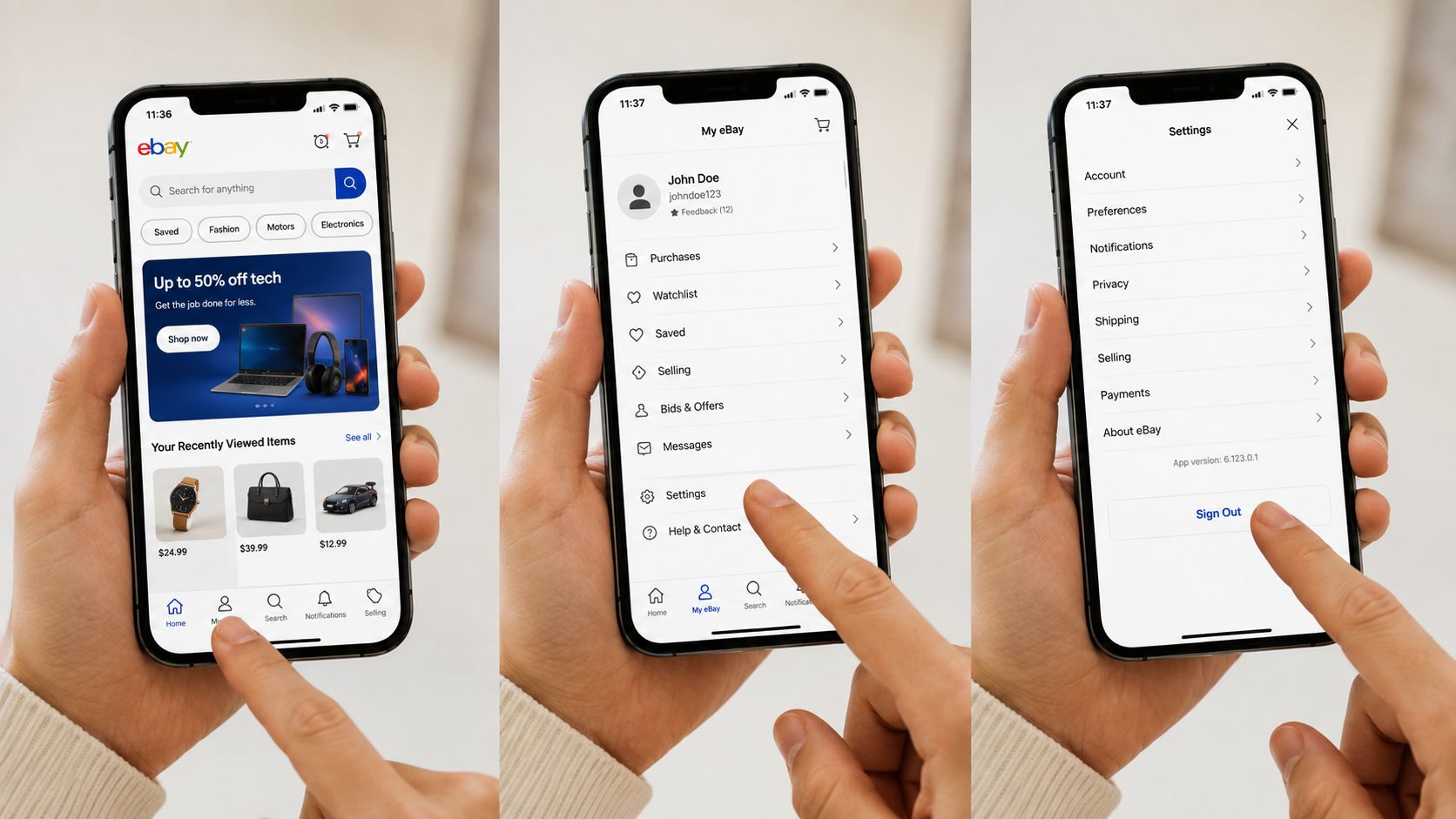
- eBay app: Tap My eBay, open Settings, then choose Sign Out.
That only ends the current session, it doesn’t delete your account or wipe saved data. If you’re stepping away properly, or preparing a handset for resale, the deeper clean-up matters too. For a fast IT-style refresher on sign-outs and account access, [quick answers to IT questions](https://finchumfixesit.com/faq) is a useful reference, and if you’re thinking about what to sell next, see our guide to [top products to sell online](https://usedmobiles4u.co.uk/good-things-to-sell-on-ebay/).
Signing Out of eBay in Plain English
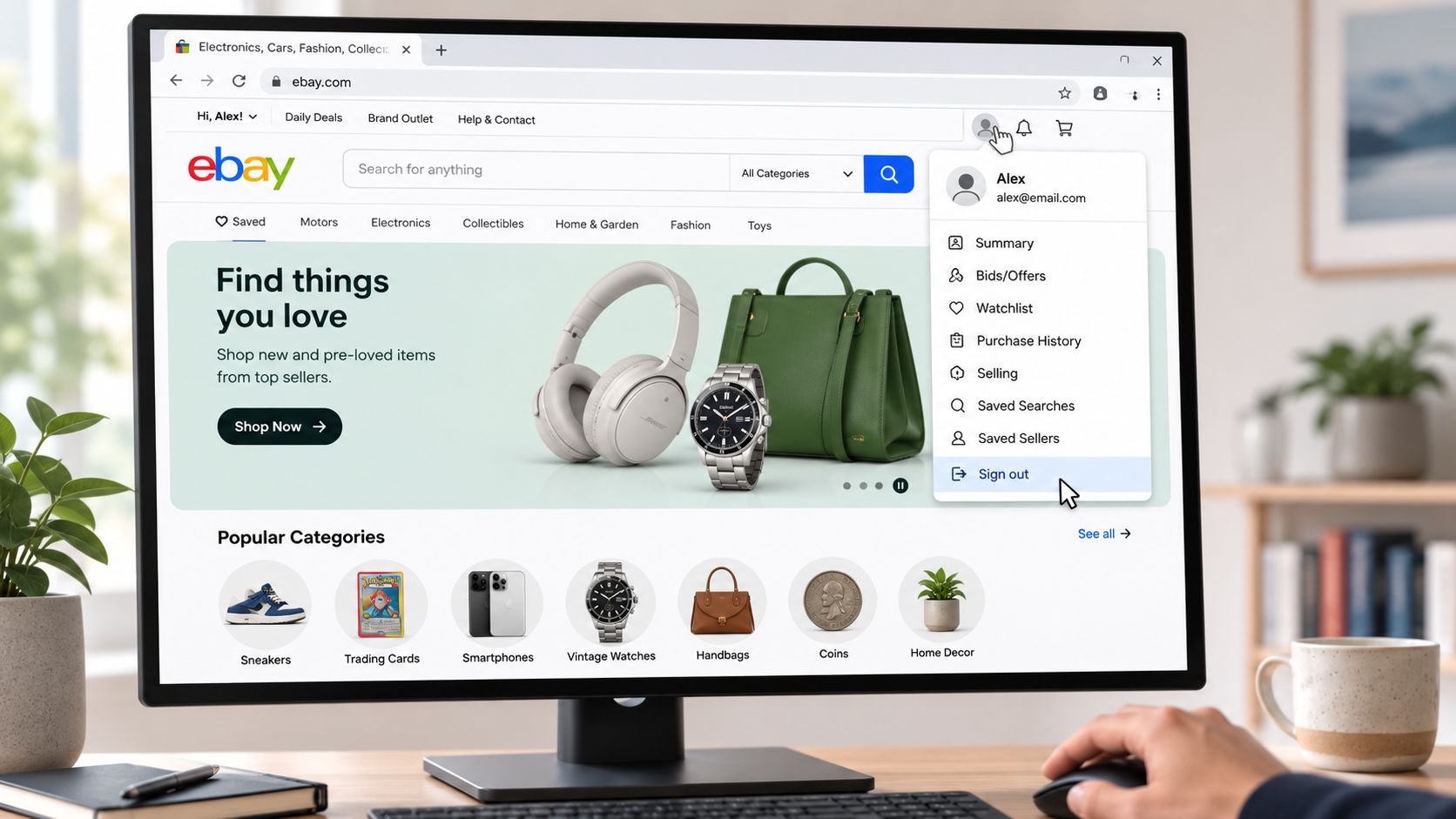
To log out of eBay, open the account menu and choose Sign out. On desktop, eBay’s help says to select your name in the top left corner of most pages, then choose Sign out, and the confirmation screen should show “You’ve signed out” when the session has ended successfully. That’s the bit people miss, they look for something dramatic, but the logout is just a clean session stop.
Signing out is not the same as closing the account. Your watchlist, purchase history, saved searches, and any saved payment details stay tied to the account unless you take the separate closure route.
For phone handovers, that distinction matters. A handset can be “logged out” and still carry a lot of account traces in the browser or app, which is why a proper resale check goes beyond the one tap. If you need a simple place to start, the [used mobiles 4 U vs eBay tips](https://usedmobiles4u.co.uk/sell-my-iphone-uk-used-mobiles-4u-vs-ebay-awesome-tips/) page is a sensible companion when you’re deciding where to sell.
Logging Out of eBay on Desktop
On a laptop or PC, the path is straightforward once you know where eBay hides it. Click your name, or the profile area in the top left of most pages, then select Sign out from the dropdown menu. Some pages say Hi, your name, which is where people often hesitate and click the wrong thing first.
After you tap it, eBay should move to a confirmation page rather than dumping you back into the homepage. The message to look for is “You’ve signed out”, because that tells you the current session has actually ended. If you don’t see that, the browser may have stalled, or you may still be looking at a cached page.
Practical rule: if you’re signing out on a shared computer, treat the browser as part of the problem too, not just the eBay menu.
What stays where it is
Logging out doesn’t clear your watchlist, cart, or saved searches. They remain attached to your account and reappear when you sign back in, which is useful if you’re comparing refurbished phones, accessories, or replacement parts across several sessions.
If you want eBay to forget the session on that machine, the sensible extra step is to close the browser properly and, on shared devices, clear the browser’s cookies and history as well. That matters far more on family PCs, work laptops, and public machines than on your own home device.
If you’re checking sign-in and sign-out behaviour for a phone you’re about to pass on, it’s worth comparing your next steps with our [Used Mobiles 4 U vs eBay tips](https://usedmobiles4u.co.uk/sell-my-iphone-uk-used-mobiles-4u-vs-ebay-awesome-tips/) guide and your own resale plan.
Signing Out of eBay on a Mobile Browser
On Safari or Chrome, the logout path is almost the same idea, but the menu sits in a different place on a smaller screen. Open the account menu, usually from the profile icon or hamburger menu, scroll down, and tap Sign out. The option can feel buried because mobile layouts collapse the account controls into a few tightly packed lines.
On iPhone Safari, the page often keeps the menu tucked behind the account icon near the top, while Android Chrome can present a slightly different ordering depending on how eBay has rendered the mobile page. The important point is not the exact skin, it’s that the sign-out control is still in the account area rather than on the main shopping screen.
After you tap it, the browser should refresh to a signed-out state. If you’re on a shared phone, a work device, or a handset you’re only borrowing, clearing cookies afterwards is a sensible extra step because sign-out alone doesn’t always scrub everything the browser has remembered.
That’s the practical difference between a casual sign-out and a real handover. When a phone is about to leave your possession, the browser history, saved logins, and autofill data deserve a look too, not just the eBay session itself. For related privacy housekeeping, the [how to wipe a mobile before recycling](https://usedmobiles4u.co.uk/how-to-wipe-a-phone-before-recycling-it/) guide fits neatly with this step.
Logging Out of the eBay App on iOS and Android
The app is where most people get stuck, because the button isn’t sitting on the home screen waiting to be tapped. Open My eBay, go into Settings, then choose Sign Out. eBay community mentors and app walkthroughs consistently place the option under Settings, and user reports say it can be visually buried, so a missed scroll or a slightly off tap is usually the real problem.
On both iOS and Android, the flow can look a little different depending on the version of the app, but the logic stays the same. You’re not looking for the sign-out control on the main shopping feed, you’re working through the account layer first. That’s why people often assume the app has frozen when it’s just waiting for them to open the right submenu.
Sign-out in the app is usually two levels deep. If the button looks missing, slow down and check My eBay and then Settings again before you uninstall anything.
Once you sign out, push notifications should stop linking that handset to your live session, and biometric login should no longer take you straight back in without prompting. Watchlist sync will return when you sign back in, which is exactly what you want if the phone is still yours and you’re just pausing use.
A common example we see is someone upgrading to a newer handset and then realising the old one still carries marketplace logins. That’s the moment to think about resale, backup, and account cleanup together rather than treating logout as the only job. If that’s your situation, our [Used Mobiles 4 U Refurbishment Process](https://usedmobiles4u.co.uk/our-refurbishment-process/) page gives a clear sense of the checks that matter before a device changes hands.
Signing Out Versus Closing Your eBay Account
Signing out ends the current session. Closing the account is a separate process, and eBay’s account guidance links it with extra steps such as clearing cache, cookies, and history from browsers used, plus removing the app from mobile devices. That’s a much fuller workflow, and it’s the one people should think about when a phone is leaving the family, being traded in, or passed to a new owner.
That difference matters because a logout leaves the account intact. Your purchase history, watchlist, and other account details remain unless you take the closure route, which sits under account settings and asks you to confirm a reason before you proceed.
Which route fits the job
- Choose sign out if: you’re done for now, the device is yours, and you’ll sign back in later.
- Choose account closure if: you’re genuinely leaving eBay and want the account removed rather than paused.
- Choose neither yet if: you’re unsure, because a rushed closure can cause more hassle than a temporary logout.
If you’re only stepping away temporarily, keep the account and sign back in later. If you’re handing the device over, treat the logout as one part of a wider privacy check, not the finish line. Our [how to wipe a mobile before recycling](https://usedmobiles4u.co.uk/how-to-wipe-a-phone-before-recycling-it/) guide is the better fit when the end goal is disposal, trade-in, or resale.
What We See at the Refurb Bench With eBay Still Logged In
One thing we regularly notice at the bench is that people remember the screen lock but forget the marketplace logins. A handset can arrive for trade-in or repair with eBay still open in the app or the browser, and that’s a privacy miss, not a technical fault.
Our technicians usually start by checking the obvious first. Open the app, go into Settings, tap Sign Out, then reopen the app to make sure it doesn’t jump straight back into the account. If it does, the browser or saved login data is still doing the work in the background.
Our bench rule: a proper handover means clearing the session, then checking the browser saved password list, autofill entries, and any remembered app login before the device changes hands.
A practical example is a customer who’s upgraded to a newer Samsung or iPhone and wants to pass the old phone on the same day. They’re usually thinking about photos, contacts, and WhatsApp first, but the eBay session is just as important because it can expose purchase history, saved addresses, and seller activity.
That’s why we treat logout as part of device preparation rather than a separate admin job. If the phone is headed for refurbishment, resale, or recycling, the same care should be applied to account access, stored passwords, and browser data. Our [Used Mobiles 4 U Refurbishment Process](https://usedmobiles4u.co.uk/our-refurbishment-process/) page sits well alongside that mindset.

Troubleshooting and Remote Sign-Out When the Button Is Missing
If the sign-out option isn’t visible, start with the simplest explanation, the page or app view has not fully loaded, or you’re looking in the wrong account area. On desktop, try the account menu again and make sure you’ve opened the full dropdown. In the app, go back to My eBay, then Settings, because the button is commonly buried there rather than on the front screen.
If the app crashes, loops back to the home screen, or refuses to stay signed out, reinstalling it often clears a stubborn local session. On browsers, clear cookies and cache, then try the sign-out path again. That doesn’t fix every login issue, but it does remove a lot of the stale session behaviour that makes people think eBay is broken.
People with more than one account also get caught out here. Logging out of one eBay account doesn’t always mean the second account has been removed from the device, so check which profile is active before you stop looking. If you’ve already handed the handset over, use eBay’s account and device settings to remove access from other devices where available, then change the password if you’re still in control of the account.
Best quick fix: if logout fails, clear the browser or app session first, then check whether another account is still signed in on the same phone.
If you’re preparing a handset for resale or repair, think in layers. Sign out, clear saved passwords, remove autofill where needed, and make sure the app isn’t quietly signed back in on a second device. That’s the difference between a casual logout and a clean handover.
Used Mobiles 4 U helps customers who are switching phones, selling old devices, or getting a handset ready for repair or trade-in. If you want a refurbished phone with clear grading, UK support, and a straightforward buying experience, visit Used Mobiles 4 U and pick a device that's been properly checked before it reaches you.
Written by James Waterston, 24 years in the mobile phone industry from customer service through to Sales Director of a global repair and recycling company. Now running Used Mobiles 4 U for over 8 years.
LinkedIn: https://uk.linkedin.com/in/james-waterston-9039a21a
Looking for a refurbished phone?
Shop professionally tested refurbished iPhones and Samsung phones with 18 month warranty, 30 day returns and free UK delivery.
Browse Refurbished Phones






