





iOS 14 Update – What Can We Expect From the iOS 14 Update?

11/06/2026

6 Mins
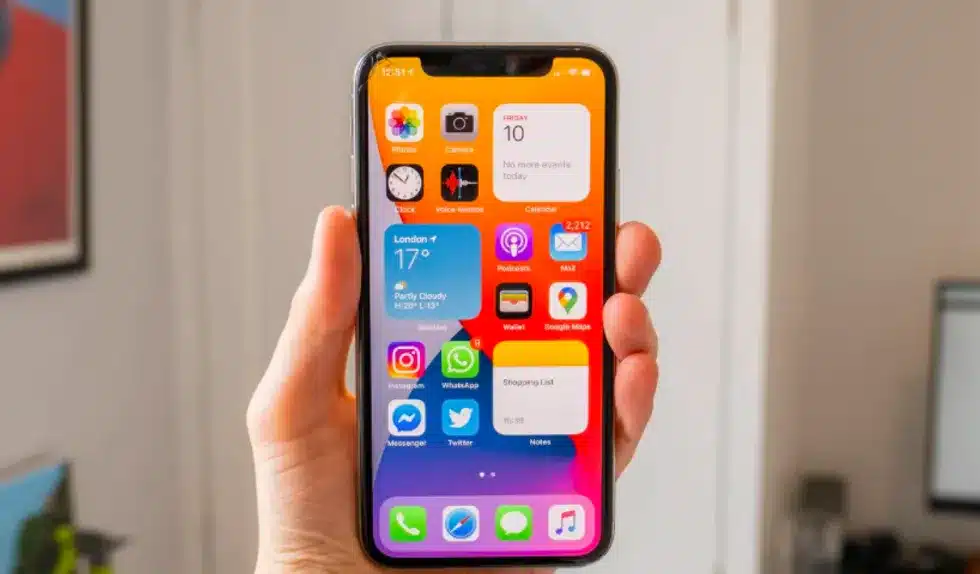
New iOS 14 Update on Apple iPhones
Apple continues to refine its mobile operating system every year, and the iOS 14 Update is expected to be one of the most talked-about releases in recent times. As with previous updates, Apple aims to improve performance, introduce new features, and enhance the overall user experience.
The update is expected to launch in autumn, following Apple’s usual release cycle. While Apple keeps most details secret until official announcements, leaks and industry rumours have already given us a fairly clear idea of what could be included.
The update is particularly important because it is expected to support a wide range of devices, including some older iPhones that are still widely used today.
In this blog, we at Used Mobiles 4 U explore everything currently known and expected about the update, including features, compatibility, performance expectations, and reliability concerns.
Why the iOS 14 Update Matters
The iOS 14 Update is not just another yearly refresh. It represents Apple’s ongoing commitment to long-term device support and software improvement. Unlike many Android manufacturers, Apple typically supports devices for five years or more.
The update is expected to continue this trend, ensuring that even older iPhones remain functional and secure.
Another reason the update matters is because Apple has been under increasing pressure to introduce more flexibility and customisation options. Many users have requested changes to the home screen, default apps, and messaging system, and the update may finally address some of these long-standing requests.
Expected Features in the iOS 14 Update
One of the most exciting aspects of the update is the range of new features that are expected to be introduced.
Apple rarely confirms features early, but based on leaks and developer insights, the iOS 14 Update is likely to include improvements across several key areas.
Fitness App and Health Tracking in the iOS 14 Update
The iOS 14 Update is rumoured to introduce a new fitness application designed to work seamlessly with Apple Watch and Apple TV.
This app would allow users to access guided workout sessions directly from their iPhones. The update could include workout categories such as yoga, strength training, walking, and cardio routines.
Users may also be able to download workouts and follow them offline, making the iOS 14 Update particularly useful for home fitness routines.
With health and fitness becoming more important in daily life, the update could position Apple as a stronger competitor in the digital fitness space.
Messages App Improvements in the iOS 14 Update
The Messages app has always been one of Apple’s strongest communication tools, but competition from WhatsApp and Messenger has pushed Apple to improve it further.
The iOS 14 Update is expected to introduce new group chat features such as tagging specific users within conversations. This would make large group chats much easier to manage.
Another expected feature in the iOS 14 Update is message reactions, allowing users to quickly respond to messages with emojis or quick responses.
These changes may seem small, but they significantly improve usability and engagement within group conversations.
Default App Changes in the iOS 14 Update
One of the most significant rumours surrounding the update is the possibility of allowing users to choose default apps.
Currently, Apple restricts users to its own apps for key functions such as web browsing and email. However, the update may allow users to set apps like Google Chrome or Gmail as their defaults.
This would represent a major shift in Apple’s ecosystem, giving users more control over their devices.
The iOS 14 Update could therefore appeal to users who prefer customisation and flexibility over Apple’s traditional closed system.
Apple Pencil and Productivity Features in the iOS 14 Update
The iOS 14 Update may also bring improvements to handwriting recognition and Apple Pencil integration.
Although the Apple Pencil is primarily used with iPads, there have been rumours that Apple is exploring ways to extend handwriting input features across iOS devices.
This means users could potentially write messages or notes using a stylus or finger, with the update converting handwriting into typed text automatically.
This feature would be particularly useful for productivity, education, and quick note-taking.
Home Screen Redesign in the iOS 14 Update
Perhaps one of the most anticipated changes in the iOS 14 Update is the home screen redesign.
For years, iPhone users have had limited customisation options compared to Android users. However, the iOS 14 Update is expected to introduce widgets directly on the home screen.
These widgets could display useful information such as weather updates, calendar events, battery status, and music controls.
The update may also introduce a more flexible layout system, allowing users to organise apps in new ways.
This would mark one of the biggest visual changes to iOS in years.
Siri Improvements in the iOS 14 Update
Siri has improved significantly over the years, but it still lags behind competitors like Google Assistant and Amazon Alexa in some areas.
The iOS 14 Update is expected to bring improvements in speed, accuracy, and contextual understanding.
Siri may also become less intrusive, appearing in a smaller interface rather than taking up the full screen.
The update could also improve Siri’s integration with third-party apps, making voice commands more useful in everyday tasks.
Privacy Enhancements in the iOS 14 Update
Apple has increasingly positioned itself as a privacy-focused company, and the update is expected to continue this trend.
Users may gain more transparency over how apps collect and use data. The update could introduce clearer indicators when apps access the microphone, camera, or location.
Another expected improvement is better control over tracking permissions, giving users more choice about how their data is used.
The iOS 14 Update could therefore strengthen Apple’s reputation as a leader in mobile privacy.
Multitasking and Video Features in the iOS 14 Update
The iOS 14 Update may also introduce improvements to multitasking, particularly picture-in-picture video support.
This feature would allow users to watch videos while using other apps at the same time. For example, you could watch a video while replying to messages or browsing the web.
The iOS 14 Update may also improve app switching speed and background performance, making multitasking smoother overall.
iPadOS Features and the iOS 14 Update
Alongside the iOS 14 Update, Apple is expected to release improvements for iPadOS.
One rumoured feature includes a disappearing cursor when using a mouse or trackpad. This means the cursor would fade when not in use and reappear when movement is detected.
The update and iPadOS improvements together show Apple’s continued focus on making iPads more powerful productivity tools.
Device Compatibility for the iOS 14 Update
One of the most impressive aspects of the update is its expected compatibility with older devices.
Reports suggest that devices as old as the iPhone 6s and iPhone SE (1st generation) may still support the update.
This level of support is rare in the smartphone industry and demonstrates Apple’s long-term software commitment.
The update therefore benefits both new and older iPhone users alike.
Performance Expectations for the iOS 14 Update
While the update is expected to bring many new features, performance remains a key concern for users with older devices.
Apple typically optimises updates to ensure compatibility across multiple generations, but some devices may still experience slower performance.
The update may slightly impact battery life or app loading times on older models, although Apple generally works to minimise these effects.
Stability and Reliability of the iOS 14 Update
After some users experienced issues with previous updates, particularly iOS 13, many are hoping the update will be more stable.
Apple usually releases beta versions before official rollout, allowing developers to test and fix issues.
The iOS 14 Update is expected to go through multiple testing phases to ensure smoother performance at launch.
Should You Install the iOS 14 Update Immediately?
When the update is released, users will face the decision of whether to install it immediately or wait.
Installing the update early provides access to new features and security improvements.
However, waiting a few weeks may allow time for early bugs to be fixed.
Final Thoughts on the iOS 14 Update
The iOS 14 Update is shaping up to be one of Apple’s most significant software updates in years.
With expected improvements in fitness tracking, messaging, home screen design, privacy, and performance, the update could significantly change how users interact with their iPhones.
The continued support for older devices also ensures that the update benefits a wide audience.
At Used Mobiles 4 U, we will continue monitoring Apple updates closely, and the update remains one of the most exciting developments for iPhone users in recent years.
Looking for a refurbished phone?
Shop professionally tested refurbished iPhones and Samsung phones with 18 month warranty, 30 day returns and free UK delivery.
Browse Refurbished Phones






