





Cable Ties Mounts: A Practical Guide for Tidy Cables

20/07/2026

9 Mins
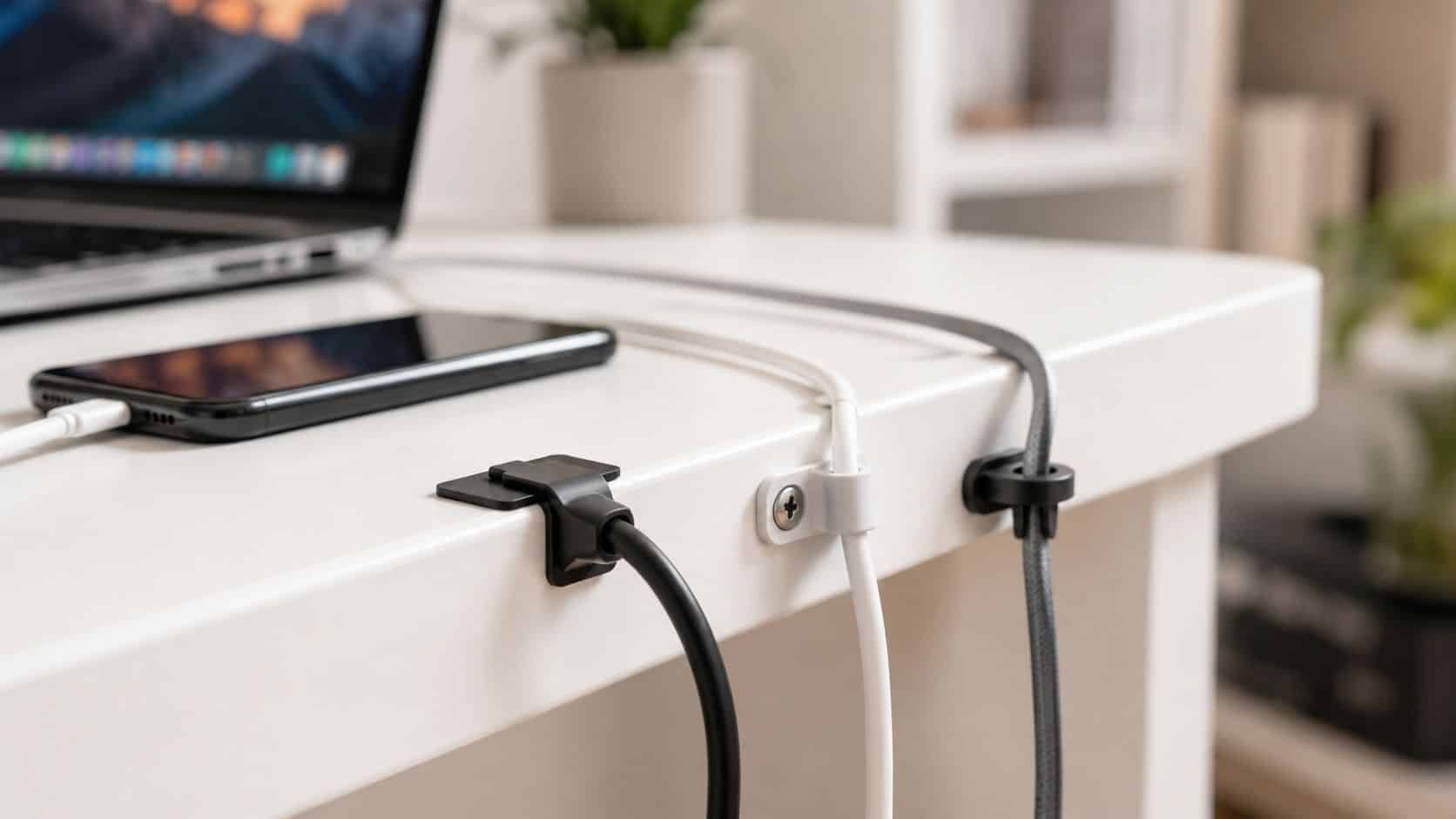
If you’ve got charger leads falling behind the desk, USB-C cables crossing over your lamp, or a repair bench that looks fine until you move one plug, cable ties mounts are the simple fix. They anchor the cables where you want them, stop strain on ports, and make a workbench or home setup much easier to live with.
Done properly, they’re one of the cheapest ways to make a setup look neater and work better. Done badly, they peel off, pull loose, or leave you with a bundle that’s harder to service than the mess you started with.
What Are Cable Tie Mounts and Why You Need Them
Cable ties mounts are small fixing points that let you secure a cable tie to a desk, wall, cabinet, shelf, or bench. In plain terms, they give the tie somewhere to live, so your cables don’t just hang under gravity and pull against each other.
If you charge one phone, one smartwatch and a pair of earbuds in the same place every day, loose cables turn into knots fast. Add a router, a laptop dock, a bedside charger, or a phone repair mat, and the problem gets worse because each lead wants to bend a different way.
Quick Answer
- Use adhesive mounts for smooth desks, monitor stands and rented spaces where you can’t drill.
- Use screw mounts for heavier cable runs, under-bench power leads and permanent setups.
- Use push mounts when you’re routing cables through panels or existing holes.
- Don’t over-tighten around charging leads, display cables or anything delicate.
That matters more now because homes are carrying more devices than they used to. The UK refurbished phone market is expanding rapidly in 2025 as buyers turn to certified refurbished Apple, Samsung and Google phones as a cost-effective option amid rising new phone prices and inflation, as noted by Handtec’s refurbished phone market trends. More phones usually means more cables, spare chargers and backup accessories to manage.
For overhead routing in offices, hobby rooms or shared desks, it’s also worth looking at overhead cable management best practices if you want to keep leads off the floor altogether. And if you’re already thinking about the bigger picture, there’s a sensible link between tidy cable setups and how refurbished devices boost sustainability, because keeping accessories organised usually means replacing fewer of them.
Practical rule: A good mount doesn’t just hide a cable. It stops repeated bending at the plug end, which is where cheap leads often fail first.
The Short Version Choosing Your Mount
If you want the fast answer, choose the mount based on the surface first, then the cable weight. Most mistakes happen because people buy by price or by packet size, not by where the mount is actually going.
- Adhesive-backed mount works best on clean, smooth surfaces like laminate desks, metal legs, monitor arms and glass. Best for temporary or non-invasive setups.
- Screw-down mount suits wood, MDF, shelving and under-desk areas where the bundle has a bit of weight. Best when you want it to stay put.
- Push mount is useful when a cabinet or panel already has a hole for fixing. Best for enclosed kit and tidier internal routing.
- Low-profile mount is the better choice near drawers, sliding keyboard trays or areas where a chunky block gets knocked.
- UV-resistant mount makes more sense near sunny windows, conservatories or outdoor boxes where ordinary plastic can go brittle sooner.
A simple way to think about it is this. Light charging cables on a desk usually want adhesive. A power strip under the bench usually wants screws. If you’re building a full workstation, it also helps to think about cable routing around screens and docks at the same time, especially if you’re planning how to set up dual monitors.
Don’t choose the biggest mount in the pack by default. Smaller anchors spaced properly usually look cleaner and put less awkward twist into the cable run.
A Closer Look at Different Types of Cable Tie Mounts
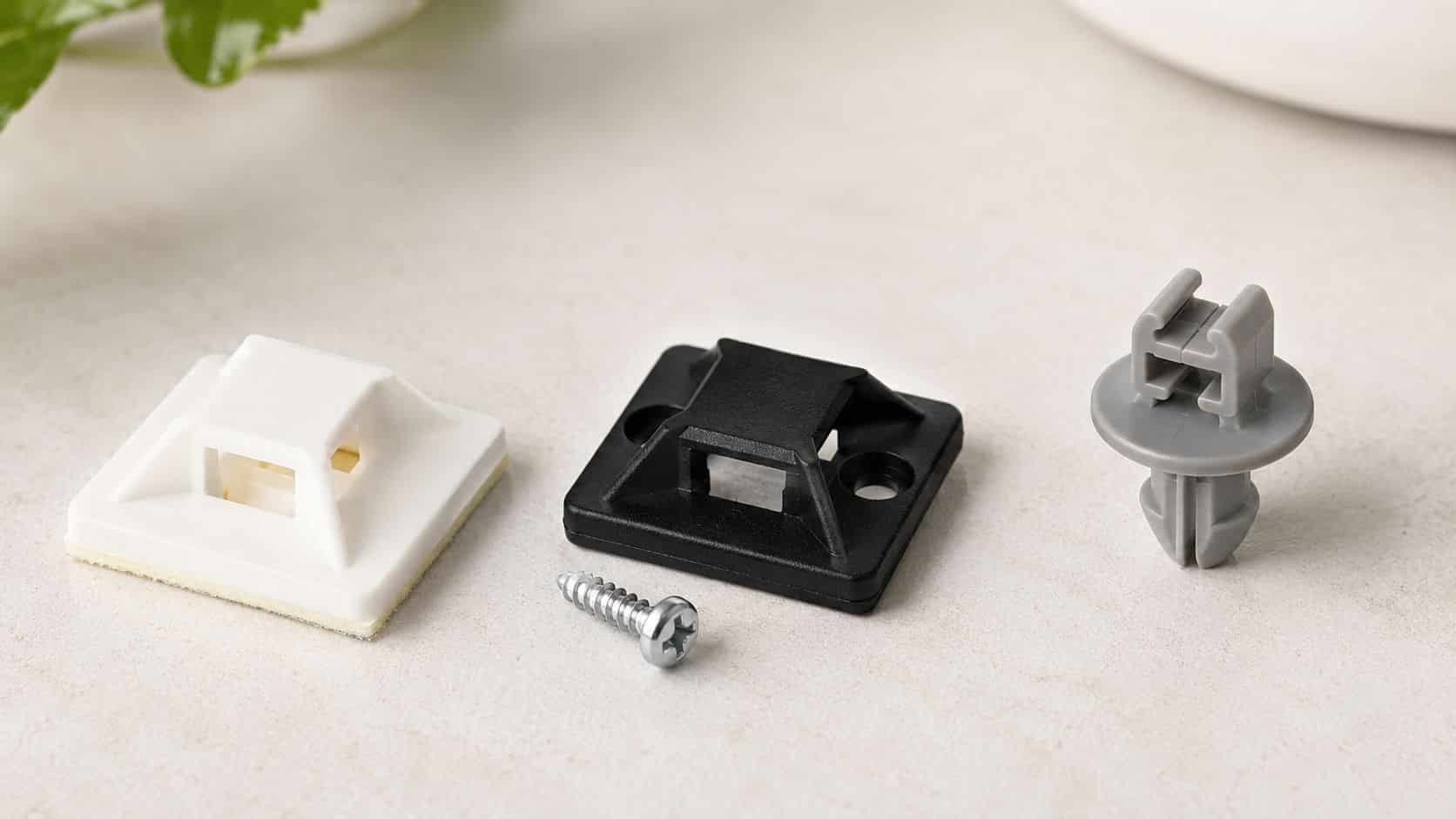
The three types most people actually use are adhesive-backed, screw-down and push mounts. Each has its place. The problem is that packaging often makes them sound interchangeable when they’re not.
Adhesive-backed mounts
These are the ones most people start with. Peel, stick, thread the tie through, and you’re sorted. On a clean desk leg or the back of a TV unit, they can work very well.
The catch is surface prep. Dust, polish, heat, textured paint and old laminate edges all make them fail sooner. They’re brilliant for light charging cables and signal leads, but they’re not the right answer for a heavy hanging bundle.
Screw-down mounts
These are the proper workshop option when you want strength more than convenience. Under a repair bench, on the side of a wooden cabinet, or anywhere a power brick and several leads are pulling downward, screw mounts are much more dependable.
They’re less tidy to fit at first because you need the right screw and the right place to put it. But once installed, they’re usually the mount you stop worrying about.
Bench note: If a cable bundle has real weight, a screw mount is usually cheaper than replacing a failed adhesive mount and sorting the mess afterwards.
Push mounts and panel mounts
These are common inside cabinets and enclosed electronics where there’s already a hole in the panel. They snap into place and give you a neat anchor without adhesive or a separate screw.
For home users, they’re less common unless you’re repurposing AV furniture, networking gear or a cabinet with existing fixing points. For tinkerers, they’re useful because they keep cable paths neat without adding sticky pads everywhere.
Material choice matters more than most people think
Standard nylon mounts are fine for ordinary indoor use. Near a bright window, in a loft room, or anywhere that gets hotter and colder than a normal office, I’d lean towards a better-quality mount rather than the cheapest assorted pack.
There’s also a sustainability angle that doesn’t get enough proper attention. The lack of data-driven advice on the environmental impact of cable tie mounts in relation to the UK’s 2025 plastic packaging and waste reduction targets leaves a real gap for buyers who want greener cable management, as discussed in this guide on cable tie fixings, bases and accessories. If you’re buying for a long-term setup, it’s reasonable to look for better-made mounts and avoid the cycle of cheap plastic parts failing and being binned.
The same practical mindset applies across accessories. If you’re cleaning up older media gear or mixed inputs on a desk, it helps to find the right component converter first so you only route the cables you actually need.
How to Choose the Right Mount for Your Needs
Start with the surface, not the cable. A good mount on the wrong surface is still the wrong choice.
Match the mount to where it’s going
- Smooth desk, glass, painted metal usually suits adhesive mounts, provided the area is properly cleaned first.
- Wood, MDF, underside of a bench often suits screw mounts because they cope better with constant pull.
- Rough plaster, flaky paint, dusty brick is awkward for adhesive mounts and often leads to early failure.
- Existing panel holes are where push mounts earn their keep.
Then think about the bundle itself. A single Lightning cable and one USB-C lead are light. A dock lead, laptop charger, power strip cord and spare charging cable all hanging together are not. That’s where people underestimate the load.
Think about permanence and access
Some setups need to come apart regularly. A phone repair bench, gaming desk or family charging point changes over time, so don’t lock everything into one over-tight route that’s annoying to reopen.
For renters, this is especially important. There’s a genuine gap in UK-specific advice for temporary cable tie mount setups in leased homes and offices, even though over 47% of UK households are renters, where drilling is often prohibited, as noted in Velcro’s piece on cable tie mounts and compliant cable artwork. In practice, that means adhesive-backed mounts are often the sensible option for renters, but only on suitable surfaces and only for sensible loads.
A useful extra read for more infrastructure-minded setups is Constructive-IT’s infrastructure cabling advice, especially if your cable run includes network gear as well as chargers and device leads.
If you’re renting, don’t test adhesive mounts on delicate paint with your best charger bundle first. Try one in a hidden area, leave it, then see how the surface behaves.
Our Experience Refurbishing This Model at Used Mobiles 4U
One thing we regularly notice on a busy repair bench is that the worst cable mess usually comes from “temporary” setups that stayed in place for months. Test chargers, inspection lights, heat mats, USB power meters and data cables all get added one by one, then someone catches a lead with a stool or foot and the whole lot shifts.
Our technicians often see the same pattern at home setups too. The cable itself is fine, but the repeated tugging near the connector has loosened the outer jacket or stressed the strain relief because the lead was left hanging with no support.

What we actually do on the bench
- We use smaller anchors more often than big ones. A few well-placed mounts create a gentler route than one large mount trying to force a hard bend.
- We keep service loops so a charger or tool can move a bit without pulling directly on the plug end.
- We prefer screw mounts underneath benches for mains leads, power bricks and anything with a bit of weight.
- We avoid tying delicate leads too tightly, especially data cables that get unplugged and reused often.
A common example we see is someone using a cheap adhesive mount under a desk for a power extension and several charging leads. It holds at first. Then heat, dust and downward pull win, and the mount lets go at the worst time.
What Buyers Usually Ask Us
- Will adhesive mounts hold a charger lead They usually will on a clean, flat surface if the lead isn’t hanging under tension.
- Are screw mounts overkill at home Not under a desk or workbench. They’re often the tidier long-term option.
- Can cable ties damage cables Yes, if you cinch them down too hard. The mount isn’t the problem. Overtightening is.
- Should every cable be fixed down No. Keep frequently changed leads accessible and only anchor the parts that benefit from staying put.
That same repair-first thinking applies when choosing devices as well. On phones we look at battery health, charging behaviour, cameras, microphones, speakers, Face ID or fingerprint unlock, port condition, screen quality and signs of heavy use before resale. The neat setup is the one that still lets you service and swap accessories without fighting it.
How to Install Cable Tie Mounts Properly Quick Steps
Most adhesive mount failures come from rushing the fit. The pad sticks to dirt instead of the surface, or the cable gets tensioned too soon.
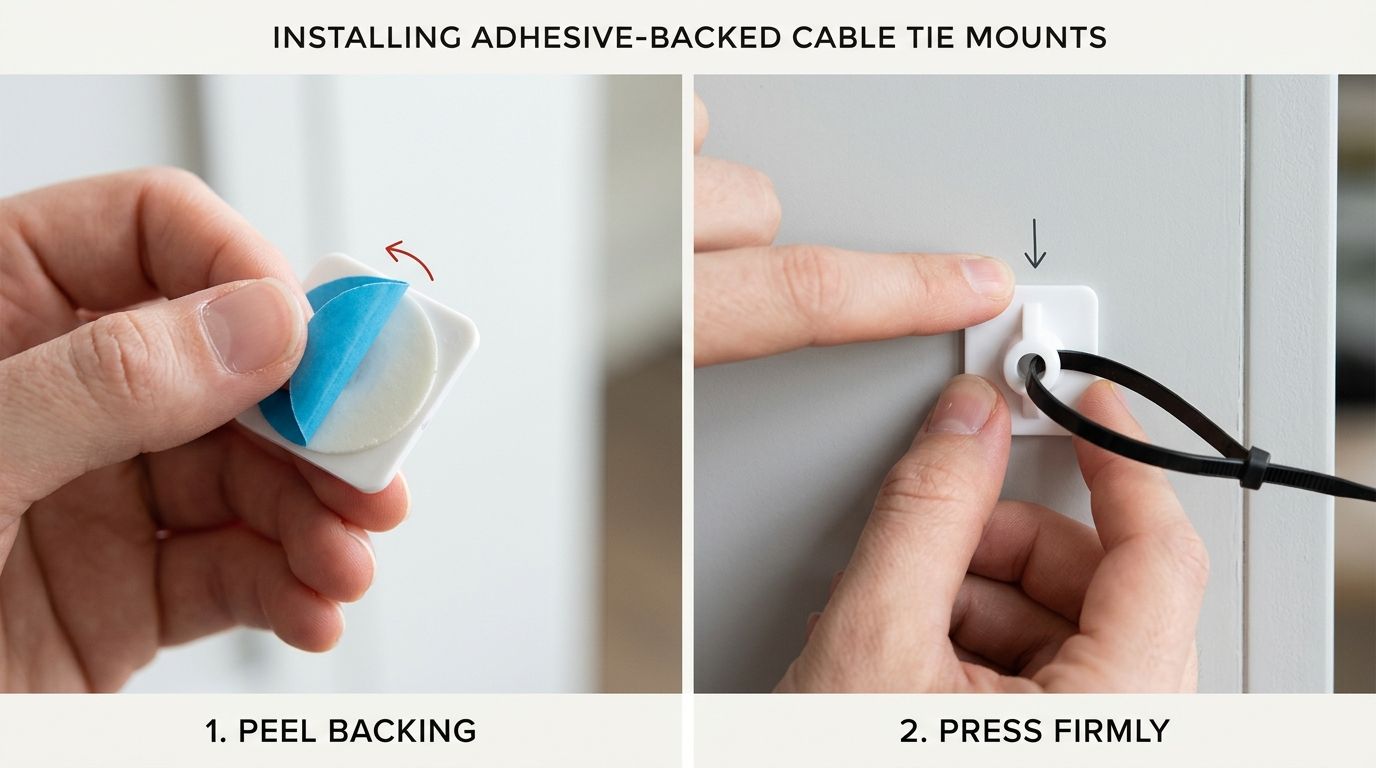
- Plan the route first. Hold the cable where you want it to sit and check that drawers, chair arms and feet won’t catch it.
- Clean the surface properly. Use an alcohol wipe or similar cleaner that leaves no greasy residue. Let it dry fully.
- Test the position before peeling. Make sure the mount won’t force a sharp bend near the connector or plug.
- Press the mount firmly into place. Apply steady pressure across the whole pad so the adhesive bonds evenly.
- Give it time to settle. Don’t load it straight away if you can help it. A little patience usually gives a better hold.
- Thread the tie and tighten gently. The tie should secure the cable, not squash it. Leave a bit of movement where the cable enters a device or charger.
- Check after a day or two. If the mount is lifting at one corner, remove it and change the surface or mount type rather than hoping it’ll improve.
If you’re sorting charging gear at the same time, this essential Android phone charger guide is worth a look so you don’t neatly mount the wrong lead and have to redo the route later.
Final verdict: Cable ties mounts are worth buying if you’ve got more than a couple of regular cables and want them to stay where they belong. They suit desks, home charging stations and repair benches especially well. Avoid the cheapest option for heavy bundles, avoid over-tightening, and choose the mount for the surface rather than the packet front.
Meta description: Cable ties mounts help keep desks, chargers and repair benches tidy. Learn which type to buy, how to fit them properly, and what works best.
Written by James Waterston, 24 years in the mobile phone industry from customer service through to Sales Director of a global repair and recycling company. Now running Used Mobiles 4U for over 8 years. LinkedIn: James Waterston
If you’re buying, comparing or replacing tech, Used Mobiles 4 U offers tested refurbished phones, clear grading, secure data wiping, UK support and a 12-month warranty. If you want a sensible phone without paying new-price money, it’s a good place to start.
Looking for a refurbished phone?
Shop professionally tested refurbished iPhones and Samsung phones with 18 month warranty, 30 day returns and free UK delivery.
Browse Refurbished Phones






