





CD Cleaner Disc: Do They Work and Are They Safe?

08/07/2026

10 Mins
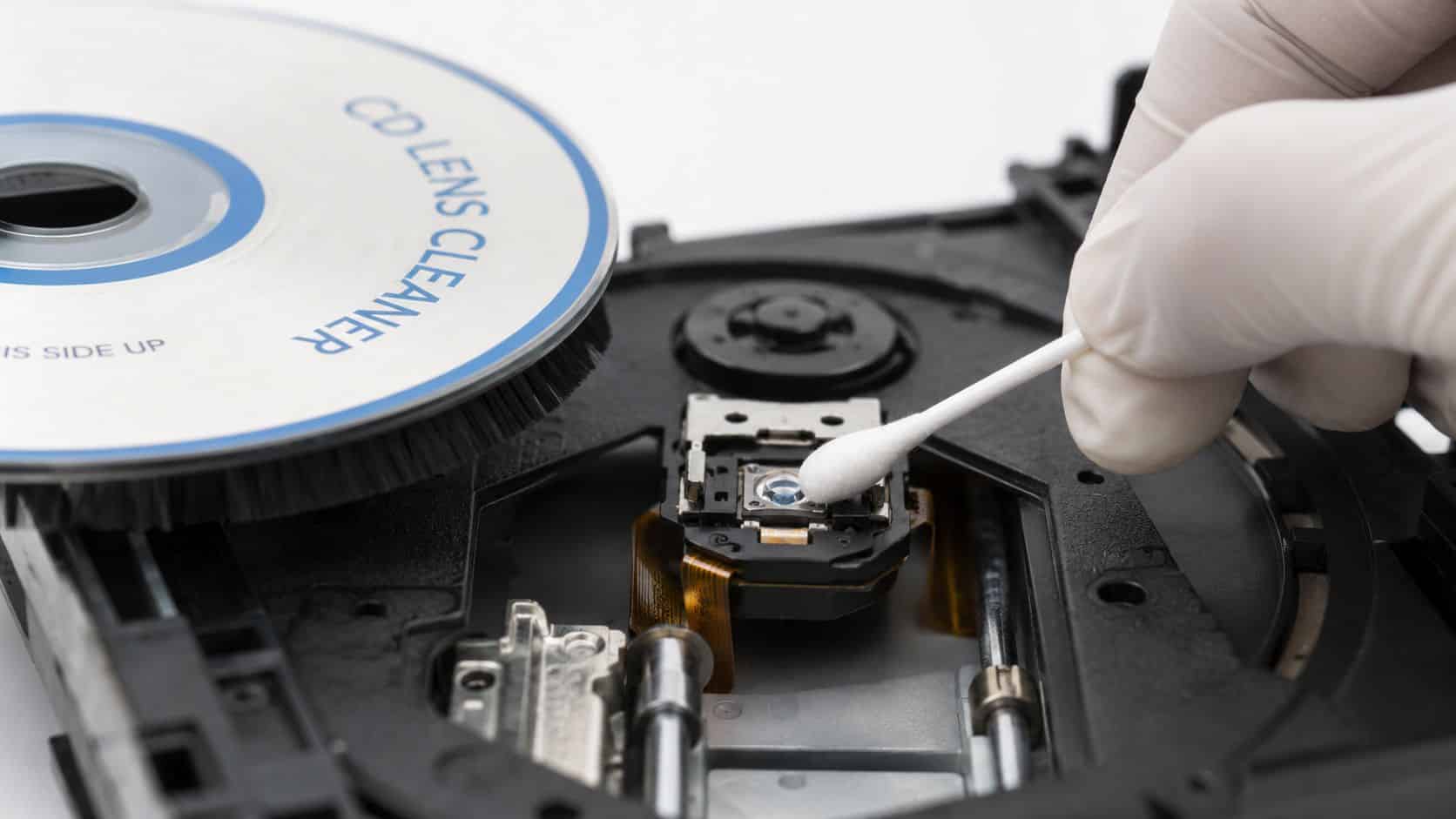
If your player is skipping, refusing to read discs, or taking ages to load, a CD cleaner disc might shift a bit of loose dust. It isn’t the safe cure-all people think it is. On anything you care about, I’d treat it as a last resort, not the first fix.
The Short Version Should You Use One?
- Main appeal: Cheap, easy to find, and simple to try.
- What it can do: Remove light, loose dust from the laser lens.
- What it can’t do: Clean sticky residue, smoke film, or grime that has built up over time.
- Main risk: The brush can be too coarse for delicate drives and may cause tracking problems.
- Best use case: An older, low-value CD player you wouldn’t spend money repairing.
- What I’d do instead: Manual lens cleaning, or replacement if the device itself is already on its last legs.
Practical take: A cleaner disc is a gamble. Fine for a throwaway unit. Not fine for a good Hi-Fi, console, laptop drive, or anything you rely on.
What Is a CD Cleaner Disc?
A CD cleaner disc is a disc with tiny brushes attached to it. You put it into the drive like a normal CD, and as it spins, those brushes pass over the laser lens inside the player.
The idea is simple. If the lens has picked up dust, the brushes may clear enough of it for the player to read discs properly again. That’s why people buy them for skipping CD players, temperamental car stereos, older DVD players, and games consoles.
The problem is that the simple fix isn’t always a good fix. In practice, these discs only deal with very light dust, and even then they’re not especially precise. Once the issue is residue, wear, weak laser output, or a mechanical fault, a cleaner disc won’t solve it and can sometimes make diagnosis harder.
How a Cleaner Disc Works and Its Limits
Most cleaner discs use a dry brush system. The brushes sit on the underside of the disc, and when the drive spins, they sweep across the lens. One product description explains that a cleaner disc uses micro-thin brushes and spins at roughly 200 to 500 RPM, with some guidance suggesting lens cleaning after every 10 hours of play on affected equipment, as noted on this AV Link cleaner disc listing.

What it’s actually doing
Think of it like using a fairly firm brush on a delicate lens. It may flick away loose dust, but it isn’t controlled enough to properly clean the surface. The drive is doing the movement, not your hand, so you can’t judge pressure, angle, or contact.
That matters because many reading problems aren’t caused by fluffy dust sitting neatly on top of the lens. They come from residue. Smoke, kitchen grease, damp storage, old adhesive particles, and general grime leave a film that a dry brush won’t lift.
Where it falls short
- Loose dust only: If the contamination is light and dry, it may help a bit.
- No real precision: You can’t target one area or inspect the lens while cleaning.
- Won’t fix larger faults: A weak laser, worn spindle motor, sticky rails, or alignment issue will still be there afterwards.
- Can give false hope: Sometimes the player works once after cleaning, then fails again because the real problem was never solved.
A cleaner disc is better at brushing than cleaning. Those aren’t the same thing.
Are CD Cleaner Discs Actually Safe?
Not universally. That’s the bit most quick guides skip over. People often assume that if a product is sold for CD or DVD drives, it must be harmless. Real-world use isn’t that tidy.
Brush-style cleaning discs can be too coarse for some drives. Some users report tracking problems after use, and the concern has long been that they aren’t well suited to more delicate CD-RW and DVD mechanisms, which are better handled by manual cleaning methods, as discussed in this TechRepublic discussion on lens cleaner safety.

Older CD players versus newer or finer drives
An old, chunky CD player can sometimes tolerate rougher treatment. That doesn’t make it ideal, but the mechanism may be less fussy. The risk climbs when you’re dealing with slimmer laptop drives, CD-RW units, DVD players, combo drives, or consoles where the optical assembly is more delicate.
One thing that catches people out is that a lens doesn’t need to look damaged to perform worse. Fine marks, disturbed alignment, or a tracking issue can leave you with a drive that reads some discs, rejects others, and wastes hours of guessing.
What usually goes wrong
- Brush contact is uncontrolled: You don’t know how firmly the brush is riding over the lens.
- Tracking can worsen: A drive that was only dirty can start behaving like it has a deeper fault.
- Misdiagnosis is common: Owners keep trying more discs, different media, and repeated cleaning runs instead of checking the actual cause.
If you’re troubleshooting older tech in general, it’s better to follow an expert guide to fixing device problems than to rely on a one-size-fits-all accessory.
Workshop rule: If the device matters, don’t let a mystery brush scrub the lens for you.
How to Use a Cleaner Disc If You Must
If you’re still going to try one, use it on something low value. An old car stereo or spare bedroom CD player is one thing. A favourite separates system, games console, or computer drive is another.
How to Use a Cleaner Disc. Quick Steps
- Power the unit off first. Let the drive stop fully before inserting anything.
- Check the disc instructions. Different cleaner discs use different tracks or spoken prompts. Follow the disc’s own method, not guesswork.
- Insert the cleaner disc gently. Don’t force the tray or slot-loading mechanism.
- Run the cleaning track once. Usually that’s track 1, but use the included instructions if they say otherwise.
- Listen carefully. If you hear scraping, grinding, or repeated seeking noises, stop straight away and eject the disc.
- Test with a known good disc. Use an original disc that normally plays well, not a badly scratched one.
- Don’t keep repeating it. If one careful pass hasn’t helped, more passes usually won’t fix the real problem.
For general device cleaning habits, including safer external cleaning, it’s worth following Used Mobiles 4 U’s cleaning advice. The same principle applies here. Be gentle, be deliberate, and don’t turn maintenance into damage.
Safer Alternatives Our Technicians Use
The better method is manual cleaning. It takes longer and usually means opening the device, but it’s far safer because you can inspect the lens, see the surrounding condition, and clean with control rather than hope.
In workshop terms, that usually means a careful clean using a cotton swab and a small amount of high-purity isopropyl alcohol. The swab should be only lightly damp, never dripping. The aim is to lift residue gently, not soak the assembly.

Why manual cleaning works better
- You can inspect first: Dust, sticky film, corrosion, and mechanical wear don’t all look the same.
- You control the pressure: That’s the big advantage over a spinning brush.
- It removes more than dust: Residue and haze can be cleaned off properly if the lens itself is still healthy.
- You can spot bigger faults: Cracked rails, weak spindle action, failing belts, and tired lasers become obvious once the unit is open.
If you’re curious how careful inspection fits into professional resale standards, a proper Refurbishment and Testing Process is a good benchmark. Good refurbishment is based on checks, not shortcuts.
Choose between the two like this
Choose a CD Cleaner Disc if:
- You are using it on a very old, low-value device you don’t mind risking.
- The problem is likely just light, loose dust.
Choose Manual Cleaning if:
- The device is valuable, such as a good Hi-Fi, games console, or computer.
- You suspect the issue is more than dust.
- You want the safest and most effective method.
Our Experience Refurbishing This Model at Used Mobiles 4U
When older laptops, media players, and the occasional console come in with optical drive complaints, our technicians don’t use cleaner discs on the bench. The risk isn’t worth it, and it doesn’t fit a proper testing standard. We’d rather open the unit, inspect it, and know what we’re dealing with.
One thing we regularly notice is that dirt is rarely the only issue. Older devices often show a mix of dried residue, tired drive motors, worn rails, heat-related brittleness, and previous DIY attempts. A cleaner disc might brush a bit of dust, but it won’t reverse age, wear, or poor storage.

What buyers usually ask us
- Can a quick clean save it? Sometimes, but only if the fault really is minor contamination.
- Is it worth repairing? That depends on the condition of the rest of the device, parts availability, and whether the unit still suits your daily use.
- Would you trust a DIY fix before resale? No. If we’re putting our name to a device, it needs proper checks, not a guess.
- Should I replace rather than repair? Often yes, especially when the hardware is dated and the drive fault is only one of several age-related issues.
A common example we see is an older console or laptop that won’t consistently read discs. Owners assume the lens is dusty because that’s the easiest explanation. Once opened, the actual issue is often residue on the lens, a weak laser, or a transport problem.
That matters because trust in professionally tested devices is rising. In the UK, 1 in 4 phones purchased in 2023 were pre-owned, which reflects growing confidence in devices that have been properly checked rather than patched with risky DIY fixes, as noted in this UK refurbished phone market update.
For the same reason, we put more weight on methodical inspection, grading, battery health, charging checks, cameras, Face ID, secure data wiping, and repeatable testing. That’s the thinking behind Used Mobiles 4 U’s refurbishing standards. Shortcuts don’t build confidence.
If a device is worth keeping, it’s worth checking properly.
What Usually Affects Value
- Condition over guesswork: Heavy wear, poor storage, and signs of previous amateur repairs usually hurt value more than a single fault.
- Tested features matter: On phones, buyers care about battery health, charging, cameras, Face ID or fingerprint function, network status, and clear grading.
- Warranty makes a difference: Buyers are far more comfortable when the device has been checked and backed up with after-sales support.
- Modern practicality wins: Software support, storage, USB-C or Lightning needs, 4G or 5G use, and overall daily speed matter more than sentimental attachment to ageing hardware.
That same thinking is one reason refurbished tech keeps gaining ground. In the UK, 70% of consumers are willing to consider refurbished electronics due to better grading systems and warranty coverage, and 30% explicitly preferred refurbished electronics over new devices in 2025, based on this UK refurbished electronics market report.
Verdict Is a CD Cleaner Disc Worth Buying?
Usually, no. A CD cleaner disc can help if the problem is nothing more than light dust on an old, low-value player. Beyond that, it’s a cheap gamble with a very ordinary success rate and a real chance of making things worse.
For anything valuable, manual cleaning is the better route. It’s more controlled, more accurate, and far more likely to reveal whether the real issue is dirt, residue, wear, or outright component failure.
If your broader problem is ageing kit that keeps needing little fixes, replacement may be the more sensible long-term answer. That’s especially true now that better grading and warranties have made refurbished tech more mainstream for UK buyers.
If you want a simple recommendation, this is it:
- Buy a cleaner disc only if: The device is old, low value, and you accept the risk.
- Avoid it if: The player matters to you, the drive is delicate, or the fault has already persisted for a while.
- Replace instead if: The hardware is tired overall and you’re only delaying the obvious.
For phone buyers, that same repair-versus-replace logic applies every day. A fully tested refurbished iPhone or other certified refurbished device with clear grading, strong battery health, warranty, and UK support is often a better bet than endlessly nursing failing older hardware.
Meta description: CD cleaner disc advice from a repair technician. Learn how they work, the risks, and when manual cleaning or replacement is the safer choice.
Written by James Waterston, 24 years in the mobile phone industry from customer service through to Sales Director of a global repair and recycling company. Now running Used Mobiles 4U for over 8 years.
LinkedIn: James Waterston on LinkedIn
If your old tech is becoming more trouble than it’s worth, have a look at Used Mobiles 4 U for fully tested refurbished phones, laptops and tablets with clear grading, warranty, UK support, and straightforward trade-in options.
Looking for a refurbished phone?
Shop professionally tested refurbished iPhones and Samsung phones with 18 month warranty, 30 day returns and free UK delivery.
Browse Refurbished Phones






