





What Affects Refurbished MacBook Trade-In Value?

31/07/2026

7 Mins

Meta description: Learn what affects refurbished MacBook trade-in value, including Apple silicon, storage, battery cycles, condition, account locks and UK market demand today.
A refurbished MacBook trade-in value comes down to more than a clean lid and a working charger. The exact model, battery condition, specification, screen, account status and signs of repair all affect what a buyer can safely offer.
A realistic quote reflects what the MacBook can be sold for after testing, refurbishment, warranty cover and resale risk are accounted for.
The Short Version
- Apple silicon MacBooks, such as M1, M2 and newer models, usually attract stronger interest than older Intel machines.
- More memory and storage can raise a refurbished MacBook trade-in value, especially because these parts cannot usually be upgraded later.
- A healthy battery, working keyboard, clean display and straight chassis matter more than minor marks.
- Activation Lock, firmware locks and missing account sign-outs can stop a trade-in completely.
- Original chargers help, but the condition of the laptop itself carries far more weight.
- A trade-in quote is lower than a private-sale price because the retailer takes on testing, warranty and resale responsibility.
Why Model, Chip and Specification Set the Starting Price
The model identifier sets the baseline. A MacBook Air and MacBook Pro may look similar from a distance, yet their screen size, chip, cooling system and ports can make a large difference to demand.
Apple silicon has shifted the second-hand market. M-series MacBooks offer strong everyday performance and battery efficiency, so they remain appealing for browsing, video calls, office work, photo libraries and study. Older Intel models can still suit lighter use, although demand is usually lower when a more recent M-series option sits close in price.
Storage and memory also matter. A 256GB MacBook is workable for cloud-based use, but it can feel tight if you keep photos, videos or large work files locally. Likewise, a model with more unified memory has greater appeal for multitasking and creative software.
When you compare a refurbished Apple MacBook Pro 2020 13-inch, check its exact processor, storage and memory rather than relying on the year alone. Two laptops released in the same year can have very different resale prospects.
The higher-spec MacBook is not always the better trade-in. A lower-spec model in sound condition can be easier to resell than a damaged model with more storage.
Cosmetic Condition Is About More Than Scratches
Small marks on the lid or palm rest are normal on a used laptop. They change the cosmetic grade, but they do not automatically mean the MacBook is a poor trade-in.
We pay closer attention to dents near the corners, a bent base, uneven screen gaps and loose hinges. A twisted chassis can put pressure on the display, trackpad or internal components. Deep dents near USB-C ports can also suggest a drop that has affected the connector.

The display deserves a proper check in a bright room. Look for cracks, pressure marks, dead pixels, flickering, lines and uneven backlighting. A tiny scuff on the casing is usually manageable. Screen damage can cut the trade-in value sharply because replacement panels are costly.
Keyboard condition also matters. Sticky keys, repeated characters, a worn space bar or a trackpad that does not click consistently all need assessment. A UK keyboard layout is usually easier to sell to UK buyers than an imported layout with different key markings.
Battery Health and Charging Reliability Affect Refurbished MacBook Trade-In Value
Battery health is one of the most important factors in a refurbished MacBook trade-in value. A MacBook can power on and still have a tired battery that drops quickly under normal use.
Cycle count provides useful context, but it is not the whole story. Battery condition, charge behaviour and whether macOS reports a service recommendation also matter. A MacBook battery diagnostic guide explains why capacity and cycle count should be considered together.
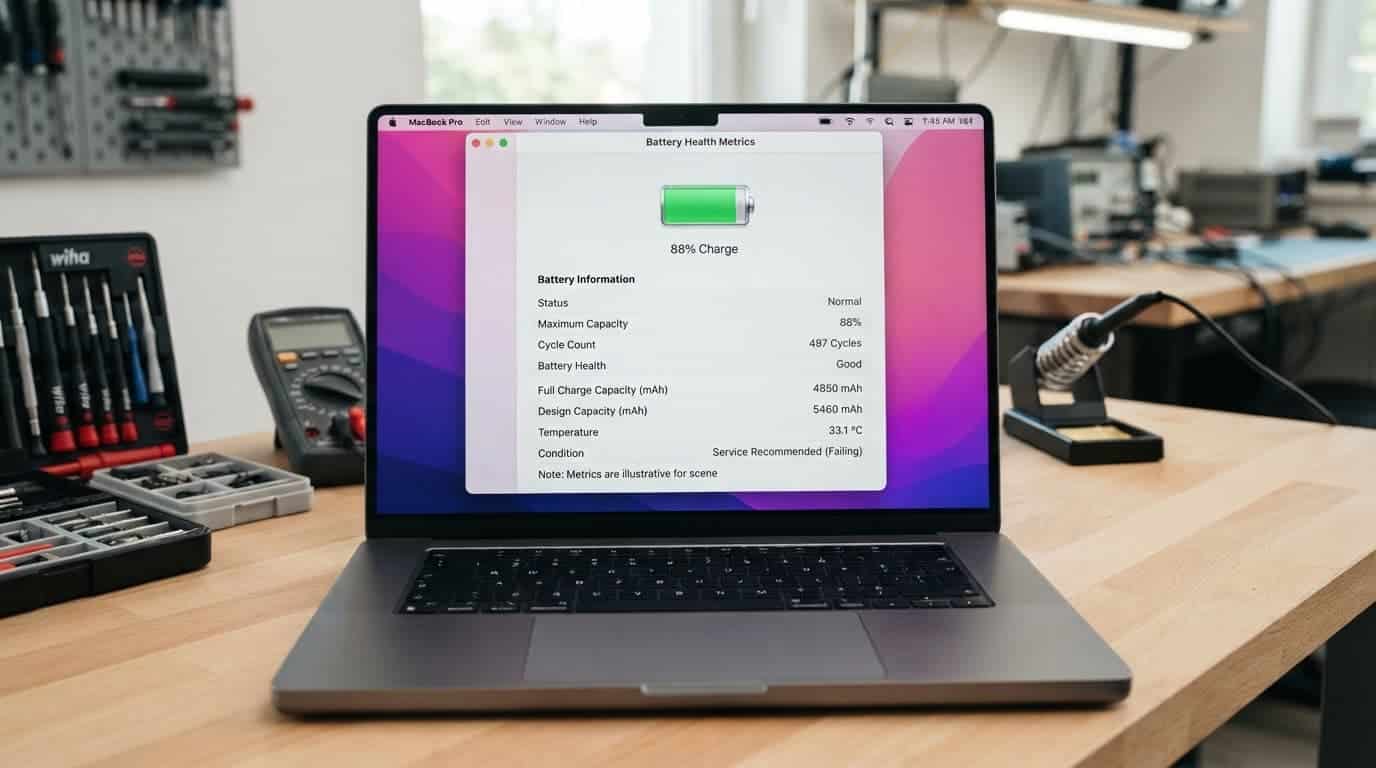
We also check whether the MacBook charges reliably through every relevant port. A cable that disconnects when moved could point to debris, cable damage or port wear. Try a known-good USB-C charger before assuming the MacBook itself is at fault.
Battery ageing does not always follow a simple pattern. An Apple Support Community discussion about M2 Air battery health shows how two laptops with similar use can report different health levels. That is why a full functional check is more useful than judging a MacBook by one number alone.
Our Experience Refurbishing This Model at Used Mobiles 4U
One thing we regularly notice is that cosmetic condition and internal condition do not always match. A MacBook with light lid scratches can test perfectly, while a spotless example may have a weak battery, a damaged USB-C port or keys that have started to fail.
On the bench, we pay close attention to the display, webcam, speakers, microphones, keyboard, trackpad, Wi-Fi, Bluetooth, charging and every available port. We also check the hinge action and look for signs that a screen or bottom case has been removed before.
The biggest difference between grades is usually cosmetic. Light scratches and small edge marks are acceptable when the chassis is straight and the machine works properly. A swollen battery, a cracked display, liquid traces or a bent frame are much more serious because they can affect reliability.
Apple silicon models often feel more consistent in ordinary use than older Intel machines, particularly for battery life and heat management. However, the individual laptop still matters. A well-kept Intel MacBook can be a sensible budget machine, while an M-series model with a damaged display may need costly work before resale.
Our approach is similar across refurbished Apple stock. Buyers looking at refurbished iPhones or a MacBook should place functional health above an immaculate-looking casing. A clean device with unknown internals is not automatically better value.
What We Commonly See
- Buyers usually trade in an older MacBook when its battery has become inconvenient or they need more storage for work and study.
- The most common concern is the offer being lower than an online private-sale listing.
- The main thing we check before resale is whether the laptop has a clean account status and passes functional testing.
- MacBook Air models tend to attract strong interest from students and home users because they are light and easy to carry.
- Customers often compare an older Intel MacBook with an M1 Air when the price gap is manageable.
- The main reason to step up is usually longer-term performance and battery life, not the appearance of the laptop.
If you are buying instead of trading in, our refurbished MacBook Air buying guide covers the practical checks that matter before you spend.
Preparing a MacBook Before Asking for a Quote
A few sensible steps can prevent a delayed quote or a rejected trade-in. Back up your files first, then sign out of iCloud and turn off Find My Mac. Activation Lock can prevent the next owner from setting up the laptop, so it must be removed before a retailer can accept it.
Next, erase the MacBook only after you have confirmed your backup works. Include the correct charging cable if you still have it. The original box is useful for safe transport, but it will not offset a screen fault or battery issue.
Be honest about faults. A quote that accounts for a cracked screen, intermittent charging or battery warning is more likely to hold up after inspection. Hiding a problem rarely helps because functional tests will find it.
If your MacBook trade-in is helping fund a phone upgrade, use the same care when comparing used iPhones UK listings. The cheapest option may have lower storage, weaker battery health or unclear warranty terms. The same applies to cheap refurbished iPhones, where the headline price tells only part of the story.
Mistakes That Can Reduce a Trade-In Offer
Many owners focus on the case condition and forget about account locks. A nearly perfect MacBook that remains linked to an Apple ID cannot move through normal resale checks.
Another mistake is sending the machine with a third-party charger that does not provide enough power. It may still charge slowly, but a proper test needs a compatible charger and cable.
Finally, do not assume every repair adds value. A high-quality battery replacement may improve usability, while a poor screen repair, mismatched parts or damaged screws can raise concerns. This is also why refurbished iPhone deals UK shoppers should check grading, battery information and warranty cover instead of choosing a listing on price alone.
Final Thoughts
A strong refurbished MacBook trade-in value comes from a current specification, sound battery, reliable charging, clean account status and a straight, fully working chassis. Minor cosmetic wear is usually less important than the condition of the screen, ports and keyboard.
Repair can make sense for a healthy MacBook with one limited fault. However, a weak battery alongside display damage, bent casing or charging problems can turn repair into poor value. The same principle applies when comparing second hand iPhones UK stock or other refurbished smartphones UK options.
If you plan to buy refurbished iPhone models after trading in your laptop, compare the full condition, battery standard and warranty alongside the price. A properly tested replacement is usually the safer long-term choice.
This advice is based on the checks we make when assessing Apple hardware for resale, including battery condition, ports, display quality, account status and signs of previous damage.
Written by James Waterston, 24 years in the mobile phone industry, now running Used Mobiles 4U. LinkedIn profile
Looking for a refurbished phone?
Shop professionally tested refurbished iPhones and Samsung phones with 18 month warranty, 30 day returns and free UK delivery.
Browse Refurbished Phones






