





How to Buy a Second Hand PlayStation 4 in the UK

04/08/2026

10 Mins

A second hand PlayStation 4 still makes sense if you want a cheap, solid games console and you're sensible about what you're paying for. It doesn't make sense if the listing looks too cheap, the controller's missing, or the seller can't prove the machine boots properly.
You're really buying two things, the console and the risk. Get the wrong one and the bargain disappears once you add a controller, cables, storage worries, or a repair bill.
Is a Second Hand PlayStation 4 Worth Buying in 2026
A used PS4 is still worth buying for the right person. It's a sensible budget console if you want a cheap way into PlayStation gaming, but the question is the total cost after accessories and possible repairs.
Quick Answer
- Best fit, families, students, and casual gamers who want a low-cost console with a big game library.
- Best model to target, the **PS4 Slim**. It’s the safest used buy in practical terms.
- Walk away if, the seller won’t show the console turning on, pairing a controller, and reading a disc.
- Watch the full cost, a cheap console with no controller or a tired hard drive can stop being cheap very quickly.
Sony says the PlayStation 4 had sold more than 117 million units worldwide by 30 June 2022, and Sony's combined PlayStation 4 and PlayStation 5 hardware sales were more than 1.640 billion by 31 March 2026. That kind of installed base is exactly why the used market in Britain stays alive instead of drying up, and why there's still plenty of stock around for budget buyers, especially with the UK accounting for 6.8 million PS4 units sold in market research cited by Sony's sales data page. Sony's business data and sales figures make the scale obvious.
Which PS4 family actually makes sense
The original CUH-1000 and CUH-1100 machines are the ones I'd treat with caution. They're the oldest, they're the noisiest risk, and they're the least forgiving if they've been sat under a TV stand collecting dust.
The Slim CUH-2000 and CUH-2100 is the one I'd target first. Later revisions have the better reputation for reliability, and the used buying guides consistently point buyers towards the Slim rather than the early launch unit. The PS4 Pro CUH-7000 only earns its keep if you specifically want the better-end model and you're happy paying more for it.
Practical rule: buy a Slim unless you have a clear reason to buy a Pro. Only chase an original PS4 if the price is so good you can afford a fault.
If you're buying for disc games and a living-room TV, a PS4 still does the job. If you care about 4K output and you're fussy about performance, the Pro is the one to look at. If you just want a dependable, cheap console that won't give you grief, the Slim is the move.
What a Used PS4 Should Realistically Cost in the UK
Used PS4 pricing in the UK is all over the place, but it isn't random. Condition, storage size, controller quality, and whether the seller includes leads all shape the price you should pay. Sony's numbers show the platform is mature, and resale data confirms the console still has measurable second-hand value despite age and depreciation.
Market data compiled in 2025 to 2026 lists typical resale ranges of $75 max / $9 min for the original PS4, $80 max / $25 min for the PS4 Slim, and $130 max / $35 min for the PS4 Pro. BankMyCell's resale guide says a used PlayStation 4 typically sells for about 40 to 45% of its original retail price, with original PS4 trade-in values commonly between $25 and $65 and PS4 Slim values between $30 and $85. Those figures aren't a UK shop price list, but they do give you a sensible benchmark so you can spot a listing that's way off. Resale guidance for PS4 values and market pricing ranges are enough to tell you when a seller is taking the mick.
Typical UK used PS4 price ranges by model
A listing that's far below the normal band usually means one of three things, there's a fault, there's missing kit, or the seller knows less than you do. A “great deal” on a Pro can be a headache if it arrives with no controller, no leads, or a storage problem. A bundle that looks generous can still be poor value if the controller is battered or the disc drive is flaky.
For buying channels, I'd rank them like this. Certified refurbishers give you the best peace of mind because you're paying for testing, returns, and a cleaner audit trail. eBay can be decent if you use strong buyer protection, but bank transfer and friends-and-family payments are a bad idea. Facebook Marketplace, Gumtree, and local seller groups can be cheap, but they're also where you're most likely to buy a console with no comeback. Auction lots can be useful for stock buyers, but for one console, they're rarely worth the gamble unless you know exactly what you're doing.
If you're comparing a used console against trade-in value, the best price for your old console is the number you should keep in mind before you overpay for a tired one.
Pre-Purchase Checks Before You Pay
If you remember one thing, remember this, never buy a PS4 on “working” alone. That's seller language, not proof. You want model confirmation, a boot video, and evidence that the console reads discs and outputs properly.
What to ask for before you commit
- Exact model number, ask for the **CUH** number from the back label. That tells you whether you’re looking at an original, Slim, or Pro.
- Powered-on video, it should show boot, controller pairing, the home screen, HDMI output, and disc insertion.
- System information screen, ask for a photo or screenshot showing storage size and firmware details.
- Disc-drive proof, the seller should show a disc going in and being read, not just a console sitting on a shelf.
- Storage health, if they can’t show any sign the hard drive is healthy, treat that as a warning.
The biggest hidden faults are usually the ones sellers don't volunteer. Loud fan noise, overheating after 15 to 20 minutes, and a worn hard drive often don't show up in a one-second boot clip. A console can look tidy and still be close to failure.
Ask for proof, not reassurance. A decent seller won't mind showing the console booting, reading a disc, and bringing up system information.
If you're buying online, screenshots matter. If the seller only sends one blurry photo and a vague message, move on. A reasonable walk-away point is simple, no CUH number, no video, no system screen, no deal.
Verifying the Console Is Legitimate
A good PS4 can still be a bad buy if the ownership side is messy. I'd want the serial number, proof of purchase if they've got it, and clear confirmation that the machine isn't tied up to someone else's account.
The practical problem is simple, if the console is still signed in to another person's PlayStation Network account, you don't know what state it's in. Ask the seller to sign out of all users, deactivate it as primary, and do a factory reset before handover. If they won't do that, I'd walk away.
The safest approach is to treat account hygiene as part of the purchase, not a favour. If you can't confirm the console's PSN status before payment, don't assume it's clean. If the seller gets defensive about basic checks, that tells you enough.
Our Experience Refurbishing the PS4 at Used Mobiles 4U
One thing we regularly notice is that the shell tells only half the story. A clean-looking PS4 can hide dust-clogged fans, old thermal paste, a tired optical drive, or a hard drive that's already on the edge.
What our technicians usually find
- Dust in the fan path, this is common on consoles that have lived under TVs or in tight cabinets.
- Degraded thermal paste, older units often run warmer than they should and need a proper clean and re-paste.
- Noisy disc drives, especially on older Slims that have had plenty of use.
- Controller wear, swollen or tired pads turn up more often than people expect.
- Non-original hard drives, and some of those are already failing when they reach us.
Our grading logic is mostly about the outside, but we never trust the outside on its own. A good shell doesn't prove good internals. A scratched unit can still be electrically sound, while a shiny one can be one spin-up away from trouble.
When a console needs a thermal paste refresh and a fan replacement, that can make sense if the rest of the machine is healthy. If the board is unstable, the drive is failing, and the storage is tired, the repair bill stops making sense. That's when replacement is the sensible call.
A common example we see is a buyer who picked up a “mint” PS4 locally, only to find the Blu-ray drive failed two weeks later. The case looked fine, the seller sounded genuine, and the hidden fault only showed up once the console was used properly. That's exactly why short testing and a proper returns policy matter more than a polished photo.
Our Used Mobiles 4U Refurbishment Process is built around those checks, because cosmetics never tell the whole story.
How to Receive and Set Up a Used PS4
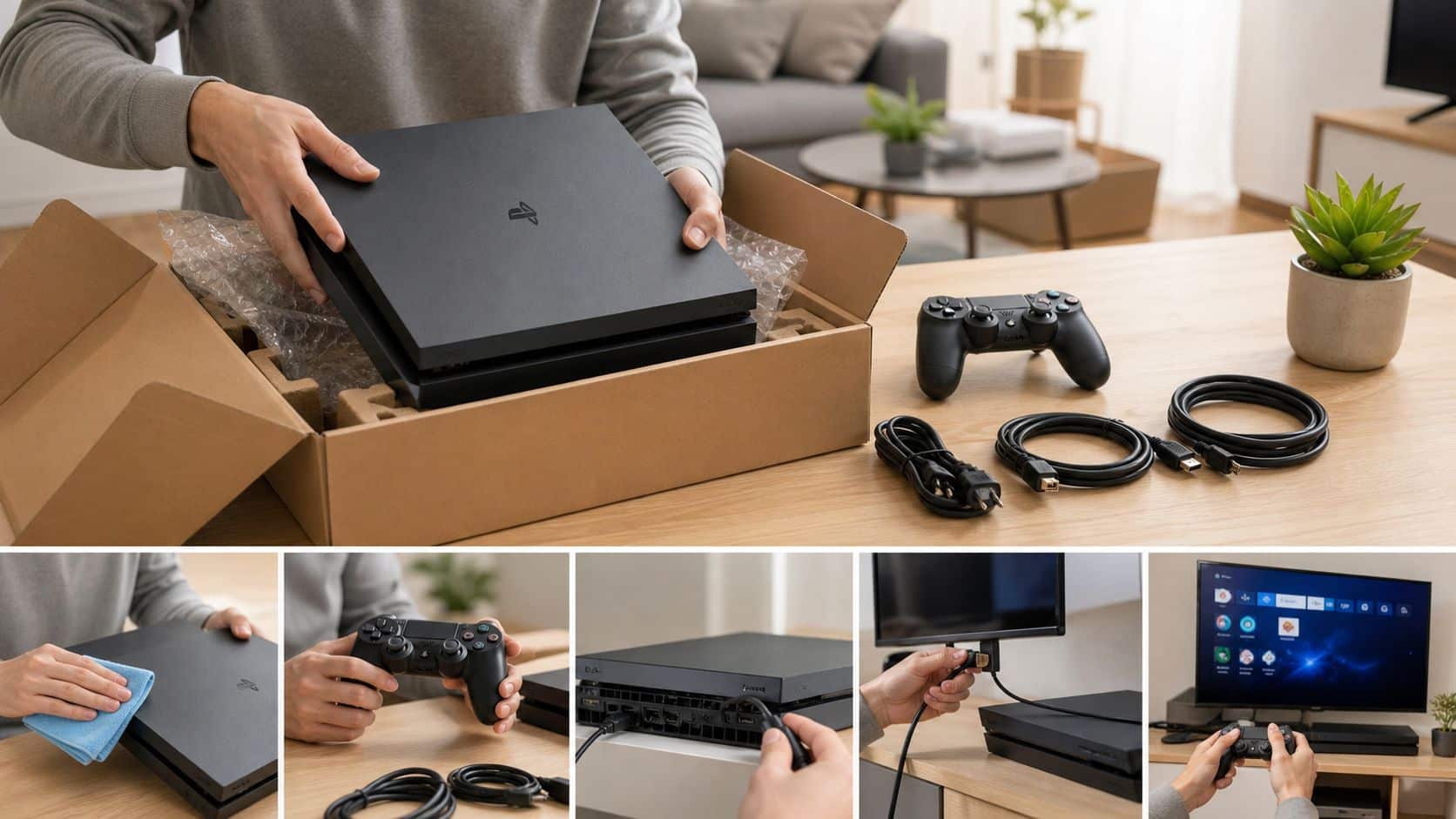
When the console arrives, inspect the box first. If the packaging looks crushed or torn, photograph it before you open anything. That gives you evidence if the seller has to answer for transit damage.
How to set it up properly
- Check the console and accessories, confirm the power lead, HDMI lead, controller, and USB cable are all there.
- Inspect for damage, photograph scuffs, cracked ports, or missing screws before you power it up.
- Boot the console, watch for the home screen, noise levels, and any warning lights.
- Sign in or create a PSN account, then let the console download the latest system update.
- Perform a full factory reset, even if the seller says it’s already wiped.
- Charge the controller fully, because a flat pad on arrival often tells you it’s been stored badly.
- Test a disc and a game install, then leave it running long enough to hear the fan under load.
If you've bought a console without the right lead or want to use older equipment through a display setup, our guide to convert old consoles to HDMI can help with the basics.
A clean install is the best way to spot a bodged repair. If the console behaves oddly after a reset, don't keep poking at it.
The first faults UK buyers usually meet are the same ones we see on the bench, blue light of death, disc ejection problems, controller drift, Wi-Fi drop-outs, and the PS4 that beeps then turns off. The cheapest sensible fix is often a proper clean, a new hard drive, or a controller replacement. If the machine keeps cutting out, refuses discs, or only works intermittently, stop tinkering and get it checked before you make it worse.
If a fault shows up in the first 14 days, contact the seller under their returns policy rather than opening the console yourself and risking your warranty.
When a Used PS4 Is and Isn’t the Right Buy
A used PS4 is worth buying if you want a sensible, low-cost console for the living room. It suits families, casual players, and anyone who mainly wants to play older PlayStation titles without paying for newer hardware.
It's also a decent choice if you want a cheap Blu-ray player or a media box and you're not chasing the latest releases. If you're comparing against a replacement route for older kit, specialist game console disposal services are worth knowing about when a machine is beyond practical repair.
Choose a used PS4 if:
- You want low upfront cost and don’t need a current-gen console.
- You’re happy with last-gen gaming and a huge back catalogue.
- You can verify the seller’s proof and accept a used controller may need replacing later.
Choose a PS5 or newer alternative if:
- You care about load times and want the newer experience.
- You plan to play modern AAA games and want a machine built for that job.
- The listing is suspiciously cheap and comes with no controller or no warranty.
If you're also thinking about selling your old kit, our how to sell my PS 4 guide helps you judge whether to keep, sell, or move on. My honest view is simple, buy a used PS4 only when the price, condition, and seller proof all line up. If any of those three are weak, spend a bit more or walk away.
Written by James Waterston, 24 years in the mobile phone industry from customer service through to Sales Director of a global repair and recycling company. Now running Used Mobiles 4U for over 8 years.
LinkedIn: James Waterston on LinkedIn
Visit Used Mobiles 4 U for tested refurbished tech, clear grading, and a straightforward way to trade in old kit or pick up a replacement that's been checked properly. If you're weighing up a second hand PlayStation 4 against other options, we'll help you choose the sensible route, not just the cheapest one.
Looking for a refurbished phone?
Shop professionally tested refurbished iPhones and Samsung phones with 18 month warranty, 30 day returns and free UK delivery.
Browse Refurbished Phones






