





The Ultimate Used iPhone 11 Pro Tips and Tricks Guide (2026 Edition)

30/05/2026

4 Mins
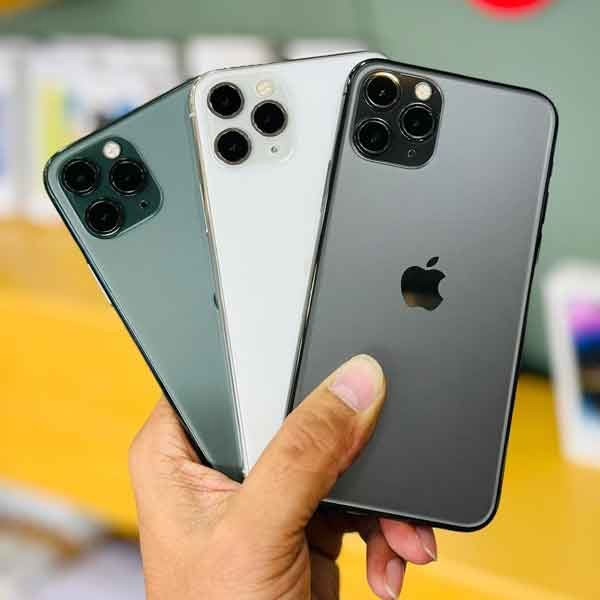
The Ultimate Used iPhone 11 Pro Tips and Tricks Guide (2026 Edition)
The iPhone 11 Pro and iPhone 11 Pro Max may no longer be Apple’s newest devices, but they remain some of the smartest buys in today’s smartphone market — especially if you’re going for a used iPhone 11 Pro.
At Used Mobiles 4 U, we see more and more people choosing a iPhone 11 Pro because it offers premium performance, excellent cameras, and long-lasting reliability — all without the flagship price tag.
But here’s the thing: most users only scratch the surface of what these phones can actually do.
So whether you’ve just picked up a used iPhone 11 Pro or you’ve had it for a while, this complete guide will walk you through the best tips, hidden features, and practical tricks to help you get the most out of your device.
Why the iPhone 11 Pro Still Holds Up in 2026
Before diving into the tips, it’s worth understanding why buying a used iPhone 11 Pro is still such a smart move.
Even years after release, the iPhone 11 Pro lineup offers:
- A powerful A13 Bionic chip that still handles apps and multitasking smoothly
- A triple-camera system that competes with newer phones
- Solid battery life for everyday use
- Continued iOS support and updates
- Premium build quality with a durable design
When you choose a iPhone 11 Pro, you’re essentially getting flagship-level performance at a much lower price — making it one of the best-value smartphones available today.
1. Get Comfortable with Gesture Navigation
If you’re upgrading from an older iPhone with a home button, the first thing you’ll notice is the switch to gestures on your iPhone 11 Pro.
It might feel strange at first, but once you get used to it, it’s faster and more intuitive.
Here are the essentials:
- Swipe up from the bottom to go home
- Swipe up and hold to open the app switcher
- Swipe left or right along the bottom to switch apps
- Swipe down from the top-right for Control Centre
- Swipe down from the top-left for notifications
After a few days, these movements become second nature.
2. Bring Back the Home Button (Sort Of)
Not everyone loves gestures — especially if you’ve just moved to a iPhone 11 Pro from an older device.
You can enable a digital home button using AssistiveTouch:
- Go to Settings > Accessibility > Touch > AssistiveTouch
- Turn it on
You can customise it to include shortcuts like Home, Siri, or screenshots.
3. Unlock the Full Power of the Triple Camera
One of the biggest reasons people still choose a iPhone 11 Pro is the camera system.
You get three lenses:
- Ultra-wide
- Wide
- Telephoto
Each one gives you more creative control over your photos.
Use the ultra-wide lens for landscapes, the telephoto for portraits, and the wide lens for everyday shots.
4. Take Stunning Low-Light Photos with Night Mode
Night Mode is a standout feature that makes the iPhone 11 Pro feel like a much newer device.
It automatically activates in low light and dramatically improves photo quality.
For best results:
- Keep your phone steady
- Let the exposure finish fully
- Use a tripod when possible
5. Use QuickTake to Never Miss a Moment
With QuickTake, your used iPhone 11 Pro lets you capture video instantly without switching modes.
Just press and hold the shutter button in photo mode.
This is perfect for spontaneous moments that happen too quickly to plan.
6. Record High-Quality 4K Video
The used iPhone 11 Pro still delivers excellent video quality, supporting 4K recording at up to 60fps.
This makes it ideal for:
- Social media content
- YouTube videos
- Personal memories
7. Try Slow-Motion Selfies (“Slofies”)
A fun feature available on the used iPhone 11 Pro is slow-motion selfies.
Switch to the front camera, enable slow motion, and create unique, eye-catching clips.
8. Turn On Dark Mode
Dark Mode improves the experience on your used iPhone 11 Pro by reducing eye strain and helping conserve battery.
Enable it in:
Settings > Display & Brightness
9. Turn Your Keyboard into a Trackpad
Typing and editing on a used iPhone 11 Pro becomes much easier with this hidden trick.
Hold the space bar to turn the keyboard into a trackpad for precise cursor control.
10. Customise Control Centre
Make your used iPhone 11 Pro more efficient by customising Control Centre.
Go to:
Settings > Control Centre
Add shortcuts like screen recording, low power mode, or flashlight.
11. Improve Battery Life with Simple Tweaks
To get the most out of your used iPhone 11 Pro, try these battery-saving tips:
- Lower brightness
- Enable Low Power Mode
- Turn off unnecessary background activity
- Use Wi-Fi when possible
12. Use Face ID Like a Pro
Face ID on the used iPhone 11 Pro is fast and secure.
Use it for unlocking your phone, making payments, and logging into apps.
13. Automatically Close Safari Tabs
Keep your used iPhone 11 Pro running smoothly by managing Safari tabs.
Set tabs to close automatically in:
Settings > Safari
14. Use Back Tap for Hidden Shortcuts
Back Tap is a hidden gem on the used iPhone 11 Pro.
Double or triple tap the back of your phone to trigger actions like screenshots or app launches.
15. Make the Most of Storage Space
Managing storage on your used iPhone 11 Pro is key.
Delete unused apps, back up photos, and clear old files regularly.
16. Keep Your iPhone Secure
Security matters, even on a used iPhone 11 Pro.
Keep your software updated and enable features like Find My iPhone.
17. Why Buying Refurbished is a Smart Move
Choosing a used iPhone 11 Pro from Used Mobiles 4 U gives you:
- Excellent value for money
- Reliable performance
- A more sustainable tech choice
18. Who Should Buy an iPhone 11 Pro in 2026?
A used iPhone 11 Pro is ideal for:
- Budget-conscious buyers
- Students
- Everyday users
- Content creators
Final Thoughts
The used iPhone 11 Pro continues to prove that you don’t need the latest device to enjoy a premium smartphone experience.
With the right tips and tricks, it still feels fast, capable, and modern in 2026.
If you’re looking for performance, value, and reliability, a used iPhone 11 Pro is still one of the best choices you can make.
Looking for a refurbished phone?
Shop professionally tested refurbished iPhones and Samsung phones with 18 month warranty, 30 day returns and free UK delivery.
Browse Refurbished Phones






