





Refurbished MacBook for Students: Your 2026 Buying Guide

16/07/2026

11 Mins

If you’re staring at new MacBook prices and wondering if a refurbished one is the sensible student option, the short answer is yes. For most UK students, a properly refurbished MacBook gives you the same core Mac experience for less money, as long as you buy on condition, battery health and warranty, not just the headline price.
A lot of students also buy a laptop hoping it’ll magically fix poor study habits. It won’t. A MacBook can help if you set it up properly, and tools that stop website distractions for productivity can make more difference to your grades than chasing the newest model.
Is a Refurbished MacBook a Good Idea for University
Yes, a refurbished MacBook is a good idea for university if you need something reliable, portable and likely to last through your course without paying full retail. The important bit is professionally refurbished, not just “used” or “pre-owned” from a random listing.
Students usually need the same few things. Good battery life, a keyboard that still feels right after long essay sessions, enough storage for documents and media, and a machine that doesn’t feel sluggish when you’ve got lecture slides, browser tabs, Teams or Zoom, and notes open at once. A decent refurbished MacBook can do that very well.
Practical rule: Buy for your course workload and your daily routine, not for the idea of “future-proofing” everything. Overspending on power you won’t use is still overspending.
The other reason refurbished makes sense is value over time. Buying a refurbished MacBook for students in the UK can mean minimum savings of £180 to £250 per year and total real savings of £900 to £1,250 over a typical five-year ownership period, while still getting a device restored to factory standards with matching warranty protection in the certified market, as covered by this UK refurbished MacBook pricing breakdown.
The Short Version What You Need to Know
If you want the quick answer before comparing models, this is the part that matters most.

- Refurbished usually beats the student discount: Apple refurbished MacBooks in the UK are typically about 15% off original retail, sometimes reaching 20% on older generations, while the standard education discount is usually 5% to 12%. Wider verified refurbishers can be 30% to 70% cheaper than new, with a one-year warranty, as outlined in this comparison of education discount versus refurbished pricing.
- You can’t stack student discount on refurbished: That’s a common misunderstanding. Refurbished pricing already does the heavy lifting. The old idea of adding a student discount on top doesn’t apply.
- Battery health matters more than cosmetic grade: A small mark on the lid won’t affect coursework. A tired battery will.
- Check the seller’s grading language carefully: “Good” can still be a very sensible buy if the screen, keyboard, ports and battery are sound.
- Buy from a specialist, not just a marketplace listing: Clear testing, proper photos, grading notes and UK support matter when something isn’t right.
- Choose by workload: For essays, web research and general uni admin, start with the Air. For design, editing and heavier project work, compare Air and Pro properly using Used Mobiles 4 U’s MacBook comparison.
Choosing the Right Refurbished MacBook for Your Course
Most students don’t need the most expensive MacBook. They need the right MacBook. That’s a different thing entirely.
The best way to choose a refurbished MacBook for students is to match the machine to the course. If your degree is mainly writing, research, online lectures and presentations, your needs are very different from someone editing video, producing music or running demanding creative apps every day.

Choose a MacBook Air if
- Your course is mostly document-based: English, history, law, business, teaching, social sciences and similar subjects usually suit the Air very well.
- You carry it everywhere: If you’re moving between halls, lectures, the library and part-time work, the Air is easier to live with.
- You want the safest value option: For many students, the Air is the sweet spot. Lower cost, lighter body, and enough performance for normal university life.
- You want a simpler buying decision: If you’re unsure where to start, a good refurbished MacBook Air guide is usually the best first step.
Choose a MacBook Pro if
- Your workload is creative and heavy: Video editing, graphic design, music production and some coding or technical workflows benefit from the extra headroom.
- You regularly push the machine for long periods: Exporting media, handling larger files and multitasking aggressively is where the Pro makes more sense.
- You need more sustained performance: Short bursts are one thing. Long sessions under load are another, and that’s often where the Pro earns its keep.
A common example we see is a student buying a Pro for essay writing because it “sounds more serious”, then carrying extra weight and paying extra money for power they barely touch.
M1 or M2 for student use
For most students, an M1 MacBook is still a very sensible choice if the condition is right and the battery is healthy. It handles everyday academic work comfortably, and it often lands in the best value bracket in the refurbished market.
M2 makes more sense if you want a bit more breathing room, plan to keep the machine longer, or your course includes more demanding software. It isn’t always a night-and-day difference for ordinary uni work, so don’t assume newer automatically means better value.
If you’re using a MacBook for note-taking, browser research, cloud storage, lectures, writing and streaming, spend more attention on battery condition and storage than on chasing one chip generation higher. If you’re running local tools for coding or experimenting with models on Apple Silicon, guidance on secure offline AI for Apple Silicon is more useful than generic spec talk because it shows the kind of workload that actually starts to separate entry-level models from stronger ones.
The student discount confusion
One point catches students out all the time. Apple’s Education discount can’t be applied to refurbished MacBooks. They’re already discounted. That matters because some buyers delay a good refurbished deal while trying to stack a student offer that doesn’t exist.
Refurbished units consistently offer savings of around 15% off new retail prices, which often beats the standard student discount, as confirmed in this Apple discussion on education discount and refurbished devices. In practice, that’s why I usually tell students to compare the actual machine in front of them, not the idea of a discount code they can’t use.
What We Check Before Resale at Used Mobiles 4U
Good refurbishment starts with honesty. A MacBook shouldn’t be listed just because it powers on and looks clean.
One thing our technicians always look for is how the machine behaves when it’s under pressure. A laptop can seem fine on a desktop screen and still run hot, ramp fans oddly, throttle performance or show charging issues once you actually use it properly.
What we check before resale
- Screen condition: We look for dead pixels, pressure marks, uneven backlighting and obvious panel damage.
- Keyboard and trackpad feel: Sticky keys, inconsistent click response and worn surfaces are all signs of heavier past use.
- Ports and charging: Loose USB-C ports, intermittent charging and cable sensitivity can turn into daily frustration for students.
- Battery condition: We don’t treat battery health as a minor detail. It’s part of whether the laptop is practical at all.
- Thermals and stability: We want to know how the MacBook behaves under proper workload, not just at idle.
Professional refurbishment protocols in the UK include a 32-point manual exam by certified technicians, including checks for high-load stress stability so the processor and cooling system can sustain demanding tasks without overheating, as described in this overview of the UK 32-point refurbishment process. That’s one of the biggest differences between a proper refurbished unit and a private sale that only says “working perfectly”.
Our Experience Refurbishing This Model at Used Mobiles 4U
One thing we regularly notice with student-suitable MacBooks is that cosmetic wear often looks worse than the machine actually is. Lid marks, edge rubbing and light palm-rest shine don’t usually tell you much about performance. Battery condition, keyboard wear and charging stability tell you much more.
Our technicians often see the same pattern. Heavier-use devices tend to show tired keys, shinier trackpads, more obvious cable wear around the charging area and a battery that no longer suits a day moving around campus. That’s where repair versus replace logic matters. If a part can be replaced properly and the machine is otherwise strong, it can still be a good refurbished option. If too many signs of hard use stack up together, it usually isn’t worth pushing into resale.
Grade differences matter most when you’re deciding what you can tolerate visually. For many students, a lower cosmetic grade is the right call if the functional side is solid. That’s why it’s worth understanding a seller’s own Refurbishment and Testing Process rather than assuming every “excellent” or “good” label means the same thing everywhere.
Understanding Grading Battery Health and Warranty
This is where students either buy well or buy badly. Cosmetic grade gets the attention. Battery health and warranty decide whether the laptop is actually convenient to own.
What grade really means
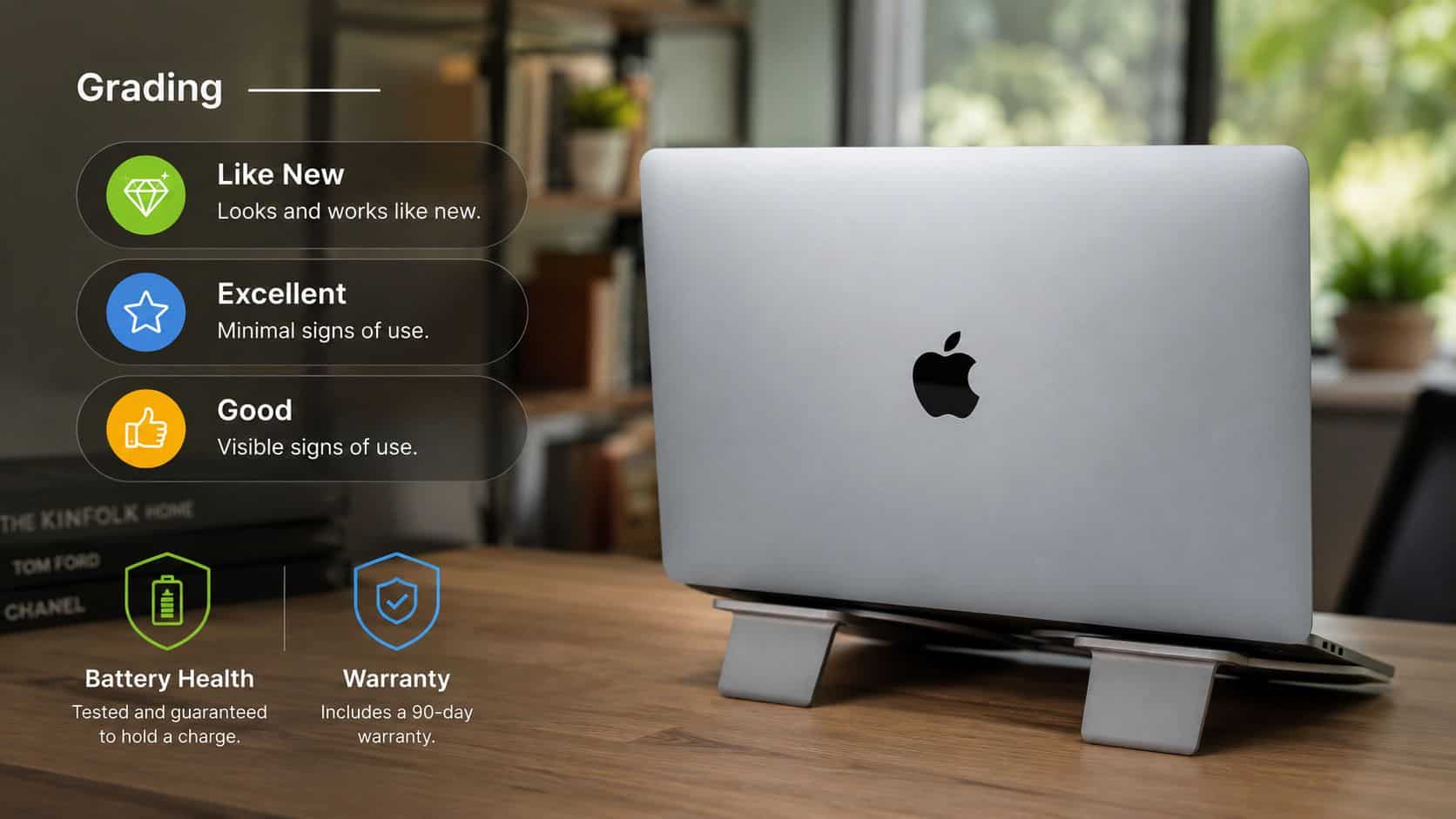
“Like New”, “Excellent” and “Good” usually describe cosmetic condition first. That’s important, but it shouldn’t be confused with performance. A MacBook in Good condition can still be the smarter student buy if it’s been tested properly and the battery is clearly stated.
- Like New: Best if you care about appearance and want minimal visible wear.
- Excellent: Usually the middle ground. Small signs of use, but still very presentable.
- Good: Most practical for tighter budgets. Expect visible marks, not functional compromise.
Don’t pay extra for spotless aluminium if the cheaper grade gives you the same dependable daily use.
Battery health for real student use
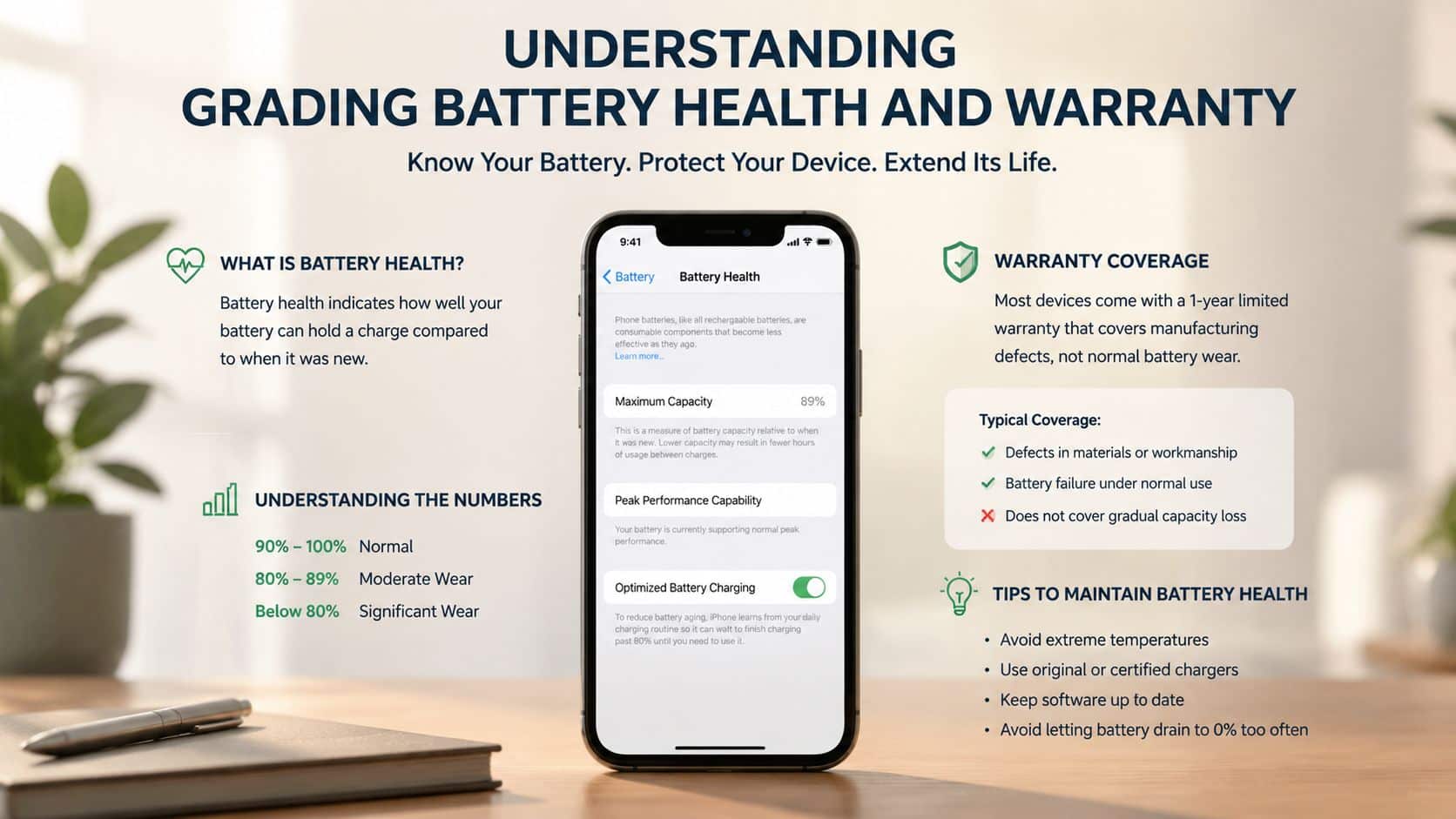
Battery health is the first thing I’d ask about when buying from a third-party seller. In the UK, professional grading standards for refurbished MacBooks require a minimum battery health of 80%, and Premium grade units often exceed 90% capacity to support at least 3+ hours of real-world battery life for general student use, based on this guidance on buying a refurbished MacBook in the UK.
That 80% point isn’t just a random number. It’s the level below which Apple diagnostics flag the battery as needing service in the verified data supplied for this article. If a seller can’t tell you the battery condition clearly, that’s usually a sign to slow down and ask more questions.
- For lecture days: You want confidence that the machine won’t suddenly become a charger-dependent laptop.
- For library use: A healthy battery gives you flexibility to work where sockets aren’t free.
- For older models: Battery quality matters even more because age affects convenience faster than light cosmetic wear does.
Apple versus third-party warranty
Students often worry that third-party refurbished means weaker protection. That’s not always true, but you do need to read the wording.
Apple guarantees a new battery in its official refurbished models. Reputable UK sellers, though, offer clear grading, transparent battery health information, often guarantee a minimum capacity above 80%, and provide 12-month warranties with comparable hardware fault cover. That closes a lot of the trust gap for budget-conscious buyers. The key phrase there is hardware fault cover. That’s not the same as accidental damage, spills or drops.
What buyers usually ask us
- Will a lower grade run slower: No, not if the issue is cosmetic only.
- Does a 12-month warranty cover everything: Usually hardware faults, not accidental damage. Read the policy, don’t assume.
- Should I avoid third-party refurbished completely: No. Avoid vague listings, not all third-party sellers.
- Is battery health more important than storage: For most students, yes. An external drive or cloud storage is easier to solve than a laptop that needs charging constantly.
Where to Buy a Refurbished MacBook Safely in the UK
There are three main routes. Apple’s own refurbished store, general marketplaces, and specialist refurbishers. Each has a place, but they don’t offer the same buying experience.
Apple refurbished
This is the safest-feeling route for a lot of buyers. The devices are tidy, the process is familiar, and Apple Certified Refurbished MacBooks in the UK are typically around 15% off original retail, with some models reaching 20% off if they’re a generation or two behind.
The trade-off is simple. You’re paying for certainty and presentation, so the savings are usually smaller than elsewhere.
Marketplace sellers
Marketplaces give you choice. They also give you mixed standards, inconsistent grading and listings that can be light on meaningful battery detail. That’s fine if you know exactly what to ask and you’re comfortable with risk. Most students don’t want that hassle in the middle of term.
If a listing talks more about “bargain price” than testing, battery and warranty, move on.
Specialist UK refurbishers
This is normally the best middle ground. You get stronger savings than Apple’s own store, but with better testing and support than a casual private sale. The wider UK refurbished market can offer MacBooks at 30% to 70% cheaper than new and still include a mandatory one-year warranty, which is why many students start with specialist retailers rather than buying new.
If you’re comparing sellers, look for clear grading, actual battery information, returns terms, UK support and a proper testing process. If you want a sensible shortlist before buying, these top refurbished laptop picks are the kind of comparison worth using because they focus on buying choices rather than vague hype.
Your Pre-Purchase Checklist and Final Verdict
Before you buy, run through this quickly. It saves a lot of buyer’s remorse.
How to buy a refurbished MacBook for students safely
- Match the model to your course: Air for most general uni work. Pro if your software and workload genuinely need it.
- Check the battery promise: Don’t settle for vague wording. You want a stated minimum or clear condition note.
- Read the warranty terms: Confirm what counts as a hardware fault and what doesn’t.
- Compare grades properly: Decide whether you care more about appearance or saving money.
- Check returns before ordering: A good returns policy matters if the grade or feel isn’t what you expected.
- Think about resale before purchase: Some Macs hold value far better than most student laptops.
That’s the part many students miss. A refurbished MacBook isn’t just cheaper on day one. It can retain 70% to 80% of its value after two to three years, and students might recover up to 95% of the cost if sold within two years, based on this analysis of refurbished MacBook resale value for students. That makes it an intelligent investment if you expect to upgrade later.
My verdict is straightforward. A refurbished MacBook for students is worth buying if you want dependable Mac performance without paying new-model money. It suits most university buyers, especially those who care more about battery, warranty and long-term value than having the latest box. I’d avoid it only if you need a very specific brand-new configuration or you’re buying from a seller who can’t explain grading, testing or battery condition clearly.
If you’re comparing options now, have a look at Used Mobiles 4 U for tested refurbished tech with clear grading, UK support and practical value. That’s usually the safer route than gambling on a vague listing and hoping for the best.
Written by James Waterston, 24 years in the mobile phone industry from customer service through to Sales Director of a global repair and recycling company. Now running Used Mobiles 4U for over 8 years.
LinkedIn: James Waterston
Meta description: Refurbished MacBook for students guide with practical UK buying advice on battery health, grades, warranty, course needs and where to buy safely.
Looking for a refurbished phone?
Shop professionally tested refurbished iPhones and Samsung phones with 18 month warranty, 30 day returns and free UK delivery.
Browse Refurbished Phones






